

Quick Answer: Which Apps Do You Need for China Travel?
For a first independent trip to mainland China, prepare a small group of reliable apps rather than downloading everything popular with local residents. Cover payment, navigation, bookings and translation first; add other services only when your itinerary needs them.
- Alipay: Your primary QR-payment option, with access to some transport and ride-hailing services.
- Amap (Gaode Maps): Local maps, metro and bus routes, walking directions and precise pickup locations.
- 12306 or Trip.com: Choose official railway booking or an English-friendly booking platform if you will travel between cities.
- Translation app: Download a Chinese language pack and check which features work offline.
- WeChat: Strongly recommended for hotel and local contacts, messaging and services accessed through Mini Programs.
- DiDi: Add the standalone ride-hailing app if you expect frequent car trips; some rides can be booked inside Alipay or WeChat.
You can skip food-delivery and review apps on a short trip. More important than the number of downloads is whether your accounts, payment methods and backup information are usable before departure.
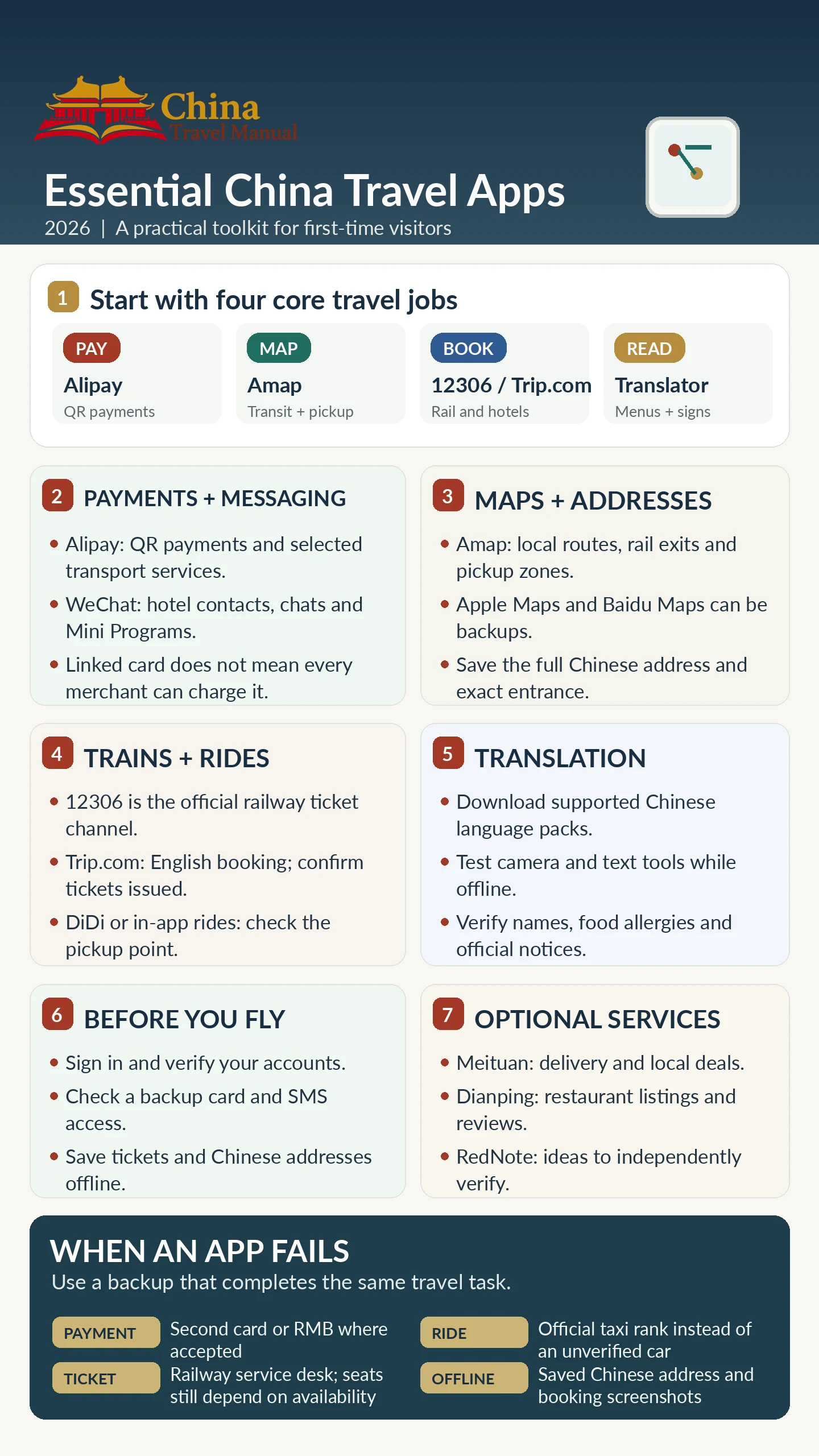
In China, the difficult part of phone preparation is rarely downloading an icon. It is finding the hotel entrance that your driver recognizes, receiving a verification code abroad, or discovering that a linked international card does not work in a particular Mini Program. This guide helps US travelers select a practical app toolkit and test it before arriving. For connectivity planning, see internet access in China.
Essential China Travel Apps at a Glance
The following priorities are editorial recommendations for a first visit, not an official app ranking. Pick a booking app based on your route, and keep a second means of paying even if the first works at home.
| App or tool | Main travel job | Priority | Check before travel |
|---|---|---|---|
| Alipay | QR payment, selected transit and local services | Core | Eligible bank card, identity checks, merchant support |
| WeChat / Weixin Pay | Messaging, Mini Programs, additional payments | Strongly recommended | Account access; payment setup is separate |
| Amap (Gaode) | Walking, transit, maps, pickup points | Core | Language, place names, route availability |
| Translation app | Signs, menus and text communication | Core | Offline language and camera features |
| 12306 | Official train tickets and after-sales service | If using trains | Passport details and account verification |
| Trip.com | Hotels, flights and train bookings | Useful for most | Fees, booking status, cancellation conditions |
| DiDi | App-based car services | If using rides often | Phone verification, pickup point, payment |
| Meituan, Dianping, RedNote | Delivery, reviews and local discoveries | Optional | Chinese-language content and service restrictions |
For a three-day Shanghai stay with no intercity trains, Alipay, Amap, a translator and possibly WeChat may be enough. For Beijing–Xi’an–Chengdu by rail, make sure either 12306 or Trip.com can handle your bookings; knowing both channels gives you a fallback, not two confirmed tickets. For a broader account of getting around China, see the transportation hub.
Alipay and WeChat: Payments, Messaging and Mini Programs
Alipay for Everyday Payments and Local Services
Alipay (支付宝, Zhīfùbǎo) is a practical starting point for QR payments in restaurants, small shops and convenience stores. Depending on the city and service, it can also provide transport QR codes, ride booking and Mini Programs. Chinese government guidance says foreign visitors can link eligible overseas bank cards to supported mobile-payment services; individual banks and merchants can impose additional checks or restrictions.[1]
Four stages should not be confused: you can register an account, link a card, pass an identity check, and still have an individual payment declined. A bank may reject a transaction; a merchant or third-party Mini Program may not support the relevant foreign-card payment route. This matters when an attraction or restaurant expects advance payment through an embedded service rather than a cashier’s ordinary QR code.
Prepare another card and a modest amount of renminbi (RMB) cash for transactions that accept it. For step-by-step setup and supported transactions, use the Alipay guide for tourists or the wider China mobile payments guide.
WeChat for Communication, Payments and Mini Programs
WeChat (微信, Wēixìn) is valuable even for travelers who expect to pay mainly through Alipay. Hotels, local guides and other service providers may use it to exchange messages, locations and booking screenshots. Some restaurants and attractions operate booking or ordering flows inside WeChat Mini Programs, so the app provides access beyond person-to-person messaging.
WeChat messaging and Weixin Pay are different functions. Being able to chat does not prove that an overseas card is enabled for every payment or that a particular Mini Program accepts it. You may also encounter identity verification, delayed SMS codes or transaction authorization by your issuing bank. For the distinction between services, read WeChat for travel and WeChat Pay for tourists.
A real-world example: a restaurant’s tabletop QR code may open a WeChat ordering interface that has no obvious Alipay checkout. Rather than assuming the linked Alipay card can pay there, ask staff for an alternate ordering and payment method. Neither digital wallet should be treated as the only possible way to buy food or take public transit.
Maps and Navigation Apps for China
Amap, Baidu Maps and Apple Maps
Amap (高德地图, Gāodé Dìtú), often called Gaode Maps, is an especially useful mainland navigation choice for train stations, walking routes, public transit and local points of interest. Its multilingual service includes English, and official Shanghai guidance describes airport guidance, hotel directions and translated local information. The multilingual app has been offered through Apple’s App Store and Google Play; translated labels and features can still vary by version or location.[2][7]
Baidu Maps is another detailed local mapping option, though travelers may encounter more Chinese interface text or place labels. On an iPhone, Apple Maps is also a usable option: Apple lists mainland China support for features including transit and traffic, though coverage and the detail of a particular entrance should be checked in the app.[8]
Do not depend on Google Maps as your only live navigation tool. Google services are blocked on many ordinary mainland connections, and stored map imagery does not guarantee current transit routes, station exits or ride-hailing pickup locations.[6] Compare a route on your chosen app while online, and review the China map apps guide for deeper differences.
Why Chinese Addresses and Exact Pickup Points Matter
A hotel’s English booking name may differ from its Chinese business listing. A driver searching that English label might find the wrong property or no result at all. Likewise, a station such as Shanghai Hongqiao or Beijing South has multiple entrances, exits and official ride-hailing zones: locating the station on a map is not the same as locating the correct pickup floor.
Save the complete Chinese destination name, street address and appropriate entrance in your phone’s photos or an offline note. At a large attraction, confirm whether your admission ticket specifies a particular gate rather than selecting the first map pin. The Chinese addresses guide explains how to make those details usable to a driver or hotel staff member.
Booking and Transport Apps: 12306, Trip.com and DiDi
Railway 12306 for Train Tickets
Railway 12306 is China’s official railway ticketing service. Its English website accepts eligible foreign passports for real-name tickets and offers purchasing, ticket changes and refunds. Carry the same valid passport used in the reservation for rail checks; an itinerary sheet alone is not a boarding document.[3]
Start identity verification early. Incorrect passport details or an unfinished verification process can delay bookings. The official service is useful for managing tickets directly and understanding railway rules, while a station ticket counter may help when online verification fails. A counter cannot create seats on a sold-out train. If your itinerary relies on several high-speed trains, consult 12306 for foreigners before the booking window opens.
Trip.com for Hotels, Flights and Travel Bookings
Trip.com is a third-party commercial booking platform with an English-oriented interface for hotels, flights, rail and selected local transfers. It can be simpler for a visitor who prefers familiar card checkout and English-language trip management. But it is not the railway operator, and any platform service fee or additional cancellation condition must be checked on the actual order.
For trains, distinguish a booking request, a pending order and a confirmed issued ticket. An order acknowledgment from a reseller does not mean the rail operator has allocated your seat. Check the ticket status, departure station and passport details before you build the rest of the day around it. The dedicated 12306 versus Trip.com comparison covers the trade-offs without turning this guide into a ticket-purchase tutorial.
DiDi for Ride-Hailing
DiDi is a major ride-hailing service for direct hotel and attraction trips, heavy luggage and late arrivals. Chinese government guidance says foreign visitors can access ride-hailing through Alipay, WeChat or DiDi’s Greater China app, which supports registration with foreign phone numbers and eligible international cards.[1]
The embedded service is convenient when you already use a super-app; the standalone app may be more comfortable for frequent rides. The interfaces, language display, identity requirements, cancellation handling and payment options can differ, so don’t assume they are identical. At airports and rail stations, use the platform’s actual designated pickup area, not merely the location dot at your exit. For further details, see DiDi for tourists.
Translation Apps for Traveling Without Speaking Chinese
A translation app is useful for reading a menu, sharing a short message with a driver or understanding an unfamiliar sign. Google Translate can download supported language files for offline text translation; camera translation may also work offline for supported languages and devices. Check its features on your own phone before travel instead of assuming every voice or camera function works without data.[4]
Phone-native translation tools are another option. Pleco is principally a Chinese dictionary and reading aid rather than a substitute for all conversational translation. You do not need all three if one tested tool covers your likely situations.
Use translation cautiously with exact names and consequential instructions. A literal translation of a poetic dish name may tell you little about its ingredients. Similar-sounding train stations can be mistaken for one another. For allergies, medical issues or official notices, ask for reliable clarification rather than trusting a blurry camera translation. Keep the original Chinese address visible alongside any English translation; the China language guide provides useful short phrases.
Optional Apps for Food, Restaurants and Local Experiences
Meituan is commonly used for food delivery and local deals; its checkout may require a precise address, specific payment methods and account verification. Dianping is useful for restaurant photos, listings and reviews, but much of the content is in Chinese. Xiaohongshu, also called RedNote, offers local suggestions and personal posts, which may be sponsored, incomplete or outdated.
These are not necessary for a short first visit. They become more attractive if you are staying longer, have a usable local address and want to explore neighborhood services. Treat user reviews as leads to verify, not as official operating hours or safety guidance. See Dianping for tourists when restaurant research becomes central to your plans.
One official digital service deserves a separate note: China’s National Immigration Administration allows eligible travelers to complete the foreigner arrival card online at no charge through its official webpage and other approved channels, including designated Mini Programs. You do not need to buy a third-party arrival-card app or pay a filing fee. Counterfeit paid filing sites have prompted an official warning.[5]
How to Prepare Your China Travel Apps Before Departure
Install only the relevant tools, preferably while you still have a reliable home connection and access to your usual phone number. The official multilingual Amap release has been available on both major app stores; availability of an individual product, version or service can nevertheless depend on the country store and device. Use genuine publisher listings, not an unknown APK or a link from a stranger.[2]
A practical preparation sequence is:
- Confirm sign-in: Open your important apps, check that you can receive verification codes and note whether your phone plan supports messages while abroad.
- Check payment eligibility: Link an accepted card where appropriate, complete any requested identity verification and keep a second independent payment option. A test that is actually supported is useful; don’t create an unnecessary purchase just to probe a payment route.
- Save places: Store hotel names, full Chinese addresses, train stations and pickup entrances in your map and in offline screenshots.
- Download offline resources: Save supported translation languages and map regions, then try airplane mode to learn what remains accessible on that device.
- Arrange connectivity: Compare international roaming, a travel eSIM and a local SIM for coverage, cost, verification texts and access to important services.
- Keep offline booking evidence: Retain rail, hotel and attraction confirmations with names, dates and reference numbers; protect sensitive passport and card information.
A local mainland SIM is not a universal legal requirement for basic tourist apps. But some delivery services and specific Mini Programs may demand a local number. Similarly, an overseas eSIM’s network routing is product-dependent; it cannot be assumed to restore every blocked service. Google’s online services are restricted on many mainland networks, and local rules apply to networking tools.[6] For the detailed connectivity choice, use roaming versus SIM versus eSIM and offline travel preparation.
What to Do When a Travel App Doesn’t Work in China
If something fails on arrival, switch to a method that can complete the same travel task rather than repeatedly retrying an unavailable feature.
- Alipay or Weixin Pay declines payment: Try another verified card or payment channel. For an in-person purchase that accepts RMB cash, pay at the cashier; an app-only prepaid order may not have a cash option.
- 12306 will not verify your passport: Check the entered document details and approach an official station ticket counter for assistance. Any replacement seat remains subject to availability.
- DiDi cannot locate your pickup: Follow signs to the official ride-hailing zone or use a licensed taxi rank. Do not arrange an unrecorded payment with an unsolicited driver.
- Maps or mobile data stop working: Display the saved Chinese hotel address and ask station staff or a legitimate transport desk for assistance; use offline language tools where available.
- Phone lost or account inaccessible: Use a travel companion’s device if available, contact your hotel or the relevant official service desk, and take steps to secure the missing phone and payment accounts.
Preparing one non-app fallback for each critical journey is more useful than installing several apps that all rely on the same phone, bank card or network. For a more focused payment recovery guide, see payment problems in China.
FAQs About China Travel Apps
What Apps Should I Download Before Traveling to China?
Start with Alipay, Amap and a translator with offline support. Add WeChat for messaging and Mini Programs, then 12306 or Trip.com if you will book intercity transport. A standalone DiDi app is useful for frequent rides but is not mandatory; local delivery and review apps are optional.
Can I Use Alipay and WeChat with a US Phone Number?
Both services can support overseas phone numbers and eligible international cards, but registration, messaging and payments are not interchangeable permissions. SMS delivery, identity checks, issuing-bank authorization and individual merchant acceptance can still cause problems. Set them up early and retain another way to pay.[1]
Does Google Maps Work in China?
Do not rely on it as your only mainland map. Google services are blocked on many local connections, and an offline map does not guarantee accurate current transit or pickup information. Test Amap or another supported local map and save Chinese addresses before traveling.[6]
Do I Need a Chinese Phone Number to Use Travel Apps?
Not for every basic travel task. Major payment and ride-hailing services support foreign numbers in specified circumstances, while some local Mini Programs or delivery options have stricter requirements. Verify the features you actually need before buying a local SIM solely for app access.[1]
What Can I Do If My Payment Apps Fail in China?
Switch to another eligible card or wallet, and use RMB cash where the merchant accepts it. For app-only services, contact the operator or use a staffed alternative rather than assuming cash can settle an online order. Maintain a second payment method and accessible booking information.[1]
Sources
[1] State Council of China. Guide to Working and Living in China
[2] Shanghai Municipal Government. China’s First Multilingual Map Adds 14 New Languages
[3] China Railway 12306. English Ticketing FAQ
[4] Google Translate Help. Download Languages to Use Offline
[5] National Immigration Administration. Beware of Fraudulent Websites for Arrival Card Filling
[6] UK Foreign, Commonwealth & Development Office. China Travel Advice: Safety and Security
[7] Shanghai Municipal Government. Digital Map Services Expand Support for International Visitors
[8] Apple. iOS and iPadOS Feature Availability