

Quick Answer: Can Foreign Visitors Use 12306?
Yes. Foreign travelers can register on the official 12306 English website or use the Railway 12306 app to book eligible Chinese train tickets with a valid passport. You do not need a Chinese national ID or, on the English site’s registration path, a mandatory +86 phone number. Register with an accessible email address, enter your passport details according to the railway’s naming instructions, complete identity verification, choose a train and passengers, pay, then check that a confirmed ticket appears in your orders.[1][2]
- Prepare early: Identity verification may require additional photos or an in-person visit; do not leave it until tickets go on sale.
- Check the result: An account, a payment attempt or a prepaid waitlist request is not the same as an issued train ticket.
- Bring your passport: Your original booking ID is required for station checks even when you hold an electronic ticket.[3]
The following steps focus on the official 12306 platform, from first registration to a ticket you can actually use.
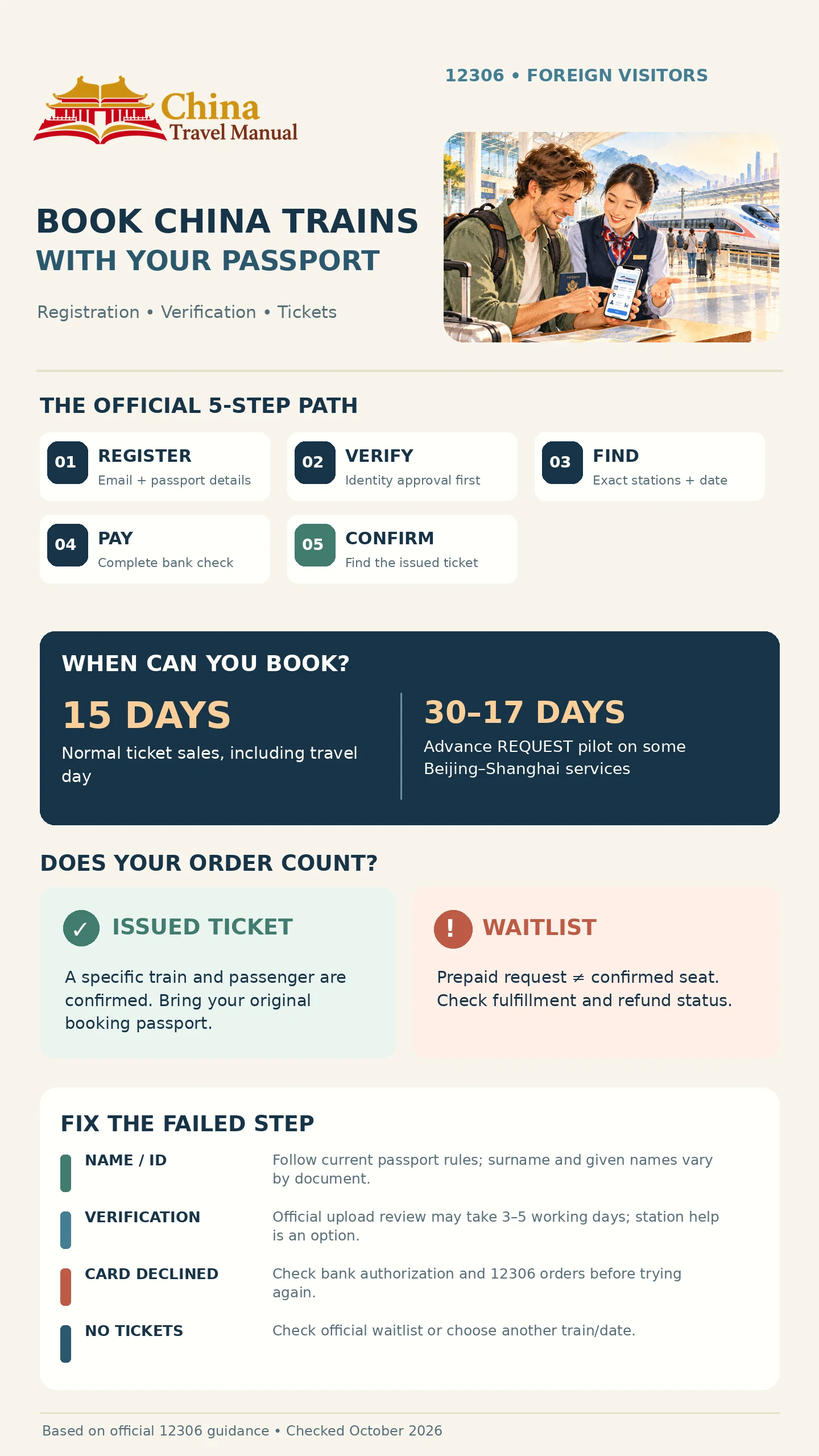
Using 12306 can remove the extra booking layer between a traveler and China’s national railway system. The difficult part for many first-time visitors is not finding a train: it is getting a foreign-passport account verified and recognizing whether the purchase actually succeeded. This guide walks through the official platform; our China train travel guide covers routes, trains and riding the railway more broadly.
What Do You Need Before Registering for 12306?
You can start from the United States, before buying your first China train ticket. Use the official English 12306 site on a browser, or the Railway 12306 app from its official listing. The website is a straightforward place to start; app labels and features may differ slightly.
| Have ready | Why it matters |
|---|---|
| Valid foreign passport | Supplies the name, passport number, expiry date and other identity details; bring the original when traveling |
| Working email address | The English registration form asks for email; keep access for activation and railway notices |
| Phone contact, if requested | Foreign passengers may use a verified email contact under railway rules; a Chinese +86 number is not universal |
| Payment method | An eligible international bank card or supported mobile-payment option; bank authorization still applies |
| Exact travel information | Date, departure and arrival stations, not only the cities |
| Companion passports | Each traveler needs accurate passenger details and any required verification |
The English registration form currently lists a single Name field, passport number, expiration date, date of birth, gender, username, password and email. It does not show a mandatory mainland mobile-number field on that particular page. Another 12306 registration route may show different contact fields, so follow the form you actually use.[1][4]
A verified email can also be used as a reserved contact method for foreign passengers under 12306’s contact-information guidance. This does not mean every optional app feature or notification channel will work identically without a phone. For the related pitfalls, see buying China train tickets without a Chinese number.[5]
How to Create a 12306 Account with a Foreign Passport
Register on the English Website or Railway 12306 App
- Open www.12306.cn/en/index.html, then find the registration option. On the English form, registration currently accepts foreign passports.
- Enter the Name and passport details exactly as required by the official passport-entry instructions. Complete the expiry date, date of birth and other requested fields.
- Choose a username and secure password; supply an email you can access. Review the terms and submit the registration request.
- Follow the confirmation or activation instructions shown by 12306, including any email sent to you. Check spam if necessary; avoid creating several accounts while waiting.
- Log in and check your account and identity-verification status. Account registration alone does not establish that the passport has been approved for booking.[1][6]
Illustrative situation: A traveler in Los Angeles opens the English website with an Outlook email and a US passport. They can submit the English form without first obtaining a Chinese SIM card. If an activation email arrives, they complete that step, then handle any passport-verification request separately. Actual verification timing depends on the system and documents, not on the city where they registered.
Enter Passport Names and Numbers Correctly
The most consequential mistake is assuming that every passport has the same name-field arrangement. The current 12306 passport guidance describes one combined name-entry field and varies the order according to how the passport prints the name. For a document with Surname and Given Names, it instructs the passenger to enter the surname followed by given names, separated by spaces. For a passport divided into First, Middle and Last Name, its example instead uses first, middle and last names in that order.[2]
| Passport presentation | How to approach the 12306 Name field |
|---|---|
| Surname: SMITH; Given Names: JOHN | Follow the surname-and-given-names rule: SMITH JOHN |
| Surname: WILSON; Given Names: MARY ANN | Keep the given names together: WILSON MARY ANN |
| First: TONY; Middle: ALAN; Last: MILLER | Follow the separately labeled first/middle/last example: TONY ALAN MILLER |
Use these as formatting illustrations, not as actual traveler records. Check the document’s printed fields and the linked railway instructions rather than guessing from US naming customs. 12306 generally calls for Latin letters and spaces between name groups, with special handling for hyphens, apostrophes and other punctuation based on the passport’s machine-readable line. Its current passport-specific guidance refers to a maximum of 64 characters, superseding older articles that indiscriminately say 30.[2]
Carefully copy the passport number, distinguishing the letter O from zero and I from one. Do not abbreviate a middle name or alter a name to match a payment-card label. If you cannot get a complex name accepted, consult train-ticket name errors and 12306 before paying.
How to Verify Your Passport and Add Passengers
Understand Passport Verification Status
12306 verifies passenger identity separately from opening an account. The railway says it may automatically check submitted information; foreign passport holders can also use an online photo-upload review or take the original passport to a station ticket office.[3]
| What the account indicates | What to do next |
|---|---|
| Identity verified / approved | Proceed to ticket search and purchase, subject to the current site prompts |
| Verification pending | Check the review instructions and allow time; do not assume tickets can already be issued |
| Verification rejected or information mismatch | Recheck the passport spelling and number, and follow the correction or re-upload option |
| Cannot complete online | Use the official station ticket office or 12306 support with the passport original |
The names of these statuses can differ between Chinese and English interfaces. On a current official upload form, 12306 requests both the passport information page and a photograph showing the traveler holding that page, with JPG/JPEG/PNG uploads smaller than 10 MB, and advises 3–5 working days for document review. Do not assume that a single passport scan or a next-day approval is guaranteed.[7]
If the site asks for more information, use its official upload flow—not an attachment sent to an unfamiliar third-party seller. Keep your registration email accessible for notices and check the account rather than relying exclusively on an expected email arrival time.
Add Family Members and Other Travelers
One account can manage eligible companion passengers, but each traveler must have their own correct identity record. In the passenger-management area, add each person’s document type, official passport name and number, and any other required fields. Then inspect that person’s verification status before buying their ticket.
Example: two Americans traveling together. Traveler A signs in and adds traveler B as a passenger, using B’s passport details—not A’s. Once the site permits both passengers to book, A selects two seats on the same Beijing South–Shanghai Hongqiao service and reviews each identity separately at checkout. Children require their own applicable free-child declaration or fare category; see China trains with children for the separate age and seating rules.[4]
Do not assume that a verified account automatically validates everyone added to it, or that two passengers will receive adjacent seats. Waitlist allocations can even place companions in different carriages.[8]
How to Search Trains and Check Ticket Release Dates
Search by Date, Exact Station and Train
Enter your date and the actual departure and arrival stations. For instance, Beijing South (北京南) to Shanghai Hongqiao (上海虹桥) is more precise than simply Beijing to Shanghai. The latter can include stations that are inconvenient for your hotel or entirely different departure locations.
Compare departure time, arrival time, travel duration, ticket price, remaining availability and seat class. Check that the listing really shows the route you want before moving to checkout. For practical station navigation, see the China railway station guide, Beijing South Station and Shanghai Hongqiao Railway Station.
Understand the 15-Day Ticket Window and Reservation Exceptions
Most ordinary tickets open for sale 15 calendar days before departure, counting the travel day; the specific station’s release time can vary. The official station-sale-time search is the right place to check the opening hour. If travel is two months away, an empty ticket list may simply mean sales have not begun.[9]
There is a narrow exception. On specified Beijing–Shanghai high-speed and conventional rail services, a 12306 app advance-request pilot has, since October 27, 2026, accepted requests from the 30th through 17th day before departure. An advance request is not a seat assignment or an issued ticket, and availability is limited to eligible services. Do not confuse it with normal sales or the different waitlist service used when tickets are sold out.[10]
If a train you need is not yet released, save the precise journey, check its sale time and set a calendar reminder. You can plan months ahead without pretending the ticket is available now.
How to Book and Pay for Train Tickets on 12306
Select the Train, Passenger and Seat Class
When tickets are on sale and your passengers are eligible to book:
- Select the exact service and the available seat class you want.
- Choose each verified passenger from your account’s passenger list.
- Review passenger identity, date, full station names, departure time and fare before confirming.
- Submit the order and complete the payment step within the deadline displayed by 12306.
- Return to your order history and check for an issued ticket for every passenger.
Do not rely on a booking-request screen as proof that both seats have been secured. If you prefer to compare official and commercial channels, our 12306 versus Trip.com comparison explains the distinction without replacing this platform tutorial.
Pay with a Foreign Bank Card or Supported Payment Method
China’s official foreign-traveler guidance confirms that eligible foreign bank cards and supported mobile-payment methods can be used to buy railway tickets on 12306. However, the available card options on a specific checkout page, verification steps and authorization remain dependent on the payment channel and issuing bank.[3]
A US Visa or Mastercard may require bank authentication, and a decline does not necessarily mean your 12306 account or passport is invalid. Verify whether the order remains unpaid, whether the bank shows a pending authorization and whether the payment provider offers a usable alternative. You can also consult our foreign bank card guide for card-level restrictions.
Payment deadline: Follow the live checkout timer; do not assume an old guide’s fixed 30-minute rule applies to every booking and payment type. When an attempt fails or times out, check the order before submitting it again.
How to Confirm Your Ticket and Use It for Boarding
After paying, open the order list and check whether an actual train ticket has been issued. The interface wording may change, so distinguish the underlying states:
| Order situation | What it means |
|---|---|
| Confirmed / issued ticket | A valid booking exists for the displayed service and passenger |
| Awaiting payment | The order has not completed payment; a deadline may apply |
| Waitlist awaiting fulfillment | Funds may have been prepaid, but the requested seat has not been issued |
| Payment error or unclear result | Check the transaction and 12306 order record before trying again |
For each confirmed traveler, verify the travel date, full station names, train number and available carriage/seat details. Take a copy of the itinerary for reference, but bring the original passport used to book. China Railway’s e-ticket rules say the itinerary sheet and reimbursement receipt are not boarding tickets. The original valid booking document is needed at the station; use a staffed gate if the automated reader cannot verify it.[4]
For the full sequence from station entrance to platform, use passport checks on China trains and our station-navigation guide, rather than treating a mobile screenshot as permission to board.
Why Is 12306 Not Working? Common Problems and Fixes
Start by locating the stage that failed. Registration, passport approval, payment and ticket issuance are separate processes; changing your credit card will not fix a passport-name mismatch.
| Problem | First check and next action |
|---|---|
| Registration will not submit | Check passport type, required fields and email; try the other official interface if necessary |
| Activation email missing | Check spam, verify the typed address and follow the site’s resend or help instructions; avoid duplicate accounts |
| Passport review pending too long | Check the current review guidance, both requested photos and name/number accuracy; contact 12306 if it exceeds the stated timeframe |
| Verification rejected | Correct the identity record using the official passport-name instructions; resubmit only as prompted or visit a station office |
| Passport already registered | Use the official account-recovery or appeal process; don’t invent a second identity |
| Foreign card declined | Check the issuing bank’s international controls and the available checkout alternatives |
| Bank charged but no clear ticket | Inspect 12306 orders and bank transaction status before purchasing again; contact official support if records disagree |
| New passport after booking | Ask 12306 how to handle a changed document and whether you must bring both passports; do not assume the ID can simply be edited |
Identity mismatch scenario: A traveler whose passport lists a surname and two given names originally places the middle name in the wrong field, causing verification to fail. They consult the official name-format instructions, correct the account as directed and submit the required images. When verification eventually succeeds, the preferred train has sold out. That is now a separate availability problem; the traveler should check official waitlisting or alternate departures rather than repeatedly changing the passport entry.
If you receive a duplicate-account message, the 12306 registration guidance describes recovery and, for some cases, station-counter identity resolution. Use official channels only. If a passport has been renewed after ticket purchase, contact the railway before departure; detailed considerations are in travel with a renewed passport after booking.[6]
How to Use 12306 for Waitlists, Changes and Refunds
Join an Official Waitlist When Tickets Are Sold Out
If a service is sold out, the official 候补 (hòubǔ, waitlist) feature lets eligible travelers submit one or more requests and make the required prepayment. 12306 attempts to fulfill the request if matching tickets become available. Until fulfillment succeeds, you do not have a confirmed seat. Unfulfilled or canceled requests are refunded under the official rules, with the refund returned through the original payment channel.[8]
In the app or website, review the waitlist’s status and fulfillment cutoff. Set a fallback train or travel date if the connection matters. Do not mistake a payment receipt for a train ticket. The full options and deadlines belong in our China train waitlist guide.
Change or Refund a Confirmed Ticket
For an issued ticket, open the relevant order and look for the platform’s change or refund action. Confirm the replacement service or refund details, review any applicable charge and check that the final request was accepted. Availability, departure timing and the chosen travel date can affect the rules; do not assume changes are always free or unrestricted. China’s foreign-traveler guidance allows changes and refunds through official online channels or railway ticket windows.[3]
If an itinerary changes or you miss a train, check the precise eligibility conditions before attempting a replacement. Our train refunds and changes guide covers the rules in detail. For a credit-card refund that has not yet arrived, distinguish railway processing from your card issuer’s posting timeline.
FAQs About Using 12306 as a Foreigner
Can I Register for 12306 Without a Chinese Phone Number?
Yes, the current English registration page uses an email field without a mandatory +86 number. Complete any identity or contact verification that the system requires; some app paths may differ.[1][5]
Can I Use a US Passport to Buy Tickets on 12306?
Yes. A valid US passport can be used for eligible 12306 bookings after the required identity checks. Carry the same original passport on the train.[3]
How Far in Advance Can I Buy Train Tickets on 12306?
Ordinary sales normally open 15 days ahead including the travel day. Some Beijing–Shanghai services offer a separate 30–17-day advance-request pilot; it is not an issued ticket.[9][10]
Does 12306 Accept Visa or Mastercard?
Eligible international cards are supported through applicable payment routes, but a US bank may still decline an individual transaction. Follow the checkout options shown and verify that payment produced an actual ticket.[3]
Do I Need to Collect a Paper Ticket After Booking?
For ordinary e-ticket travel, no paper pickup is needed. Bring your original booking passport and check the confirmed ticket details before going to the station.[4]
Sources
[1] China Railway 12306. Official English Registration Form
[2] China Railway 12306. Rules for Entering Foreign Passport Names and Numbers
[3] State Council of China. 2025 Guide to Working and Living in China: Transportation
[4] China Railway 12306. Official English FAQ: Ticketing and E-Tickets
[5] China Railway 12306. Passenger Contact Information Guidance
[6] China Railway 12306. Registration and Account Problems
[7] China Railway 12306. Official Passport Verification Upload Form
[8] China Railway 12306. Official Ticket Waitlist Rules
[9] China Railway 12306. Railway Ticket Sale and Presale Rules
[10] China Academy of Railway Sciences. Advance Ticket Request Pilot Adjustment, September 2026