

Quick Answer: Which Map App Should You Use in China?
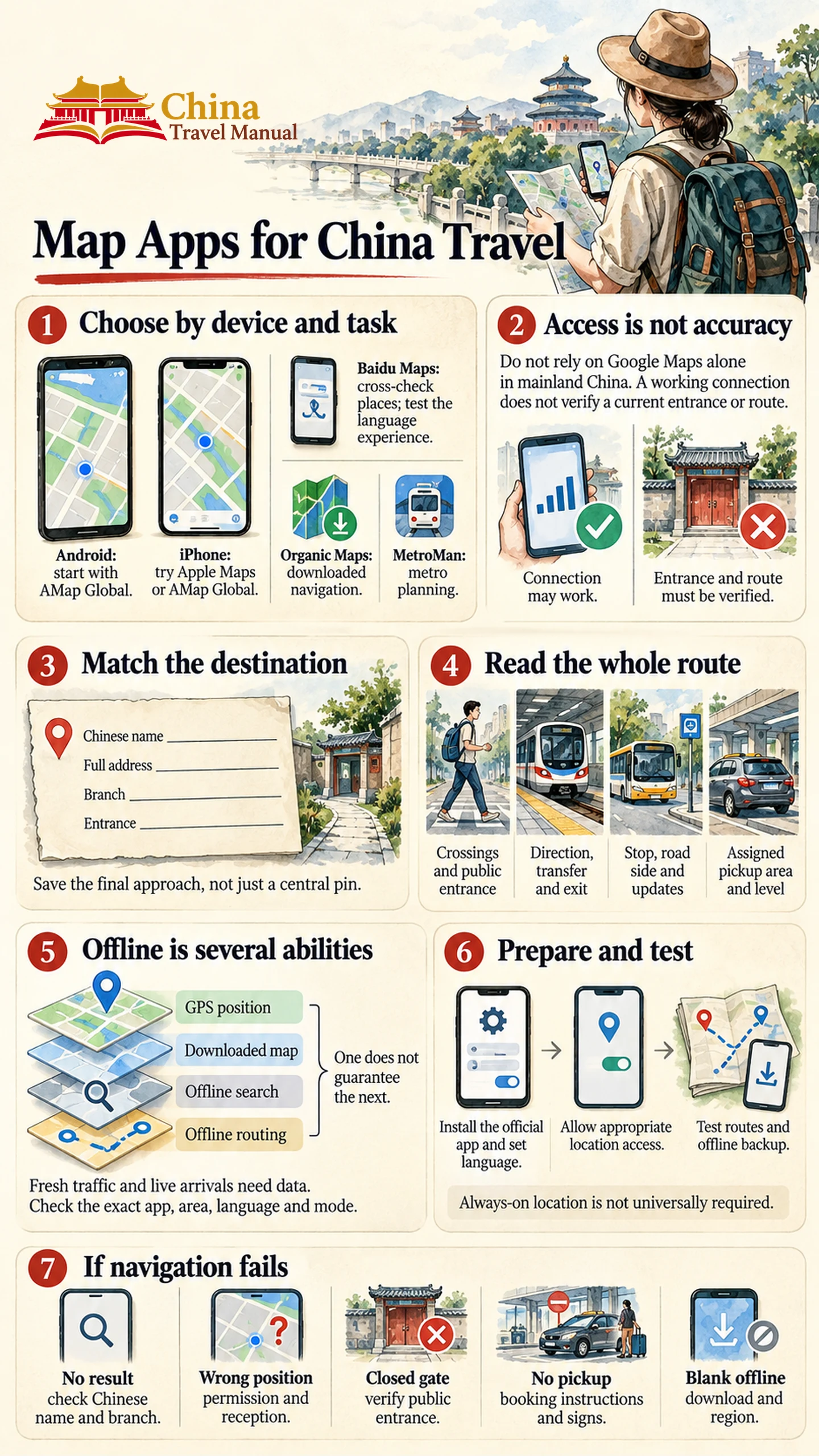
For an English-speaking visitor to mainland China, AMap Global is a practical starting point on Android. On iPhone, try Apple Maps or AMap Global and keep whichever handles your actual destinations more comfortably.
- For everyday navigation: Test hotel searches, walking routes and public transport in your main app before departure.
- For a second opinion: Use Baidu Maps to cross-check a place, while checking its language options on your device.
- For offline backup: Consider Organic Maps for downloaded maps or MetroMan for metro planning.
Keep Chinese addresses and entrance details offline. Do not rely on Google Maps alone, or assume an app’s English listing guarantees every feature in English.
The best map apps for China travel solve different jobs: finding the right property, choosing a route and reaching an entrance you can actually use. One main map and a tested backup are usually more useful than several unfamiliar apps. This guide focuses on mainland China, with features checked on October 29, 2026. Check your current app version, phone and store region before relying on a specific feature.
Compare the Main Map Apps for China
Start with your phone and your main travel task. AMap Global is listed on both the App Store and Google Play, with search and multiple transport modes. Its iOS listing includes English, but individual place records and features still need checking in the version you install.[1][2]
| App | Main role | What to check |
|---|---|---|
| AMap Global / Gaode | A main map for local searches, walking and public-transport routes on iPhone or Android. | English interface, spoken guidance, destination results and offline tools on your actual version. |
| Apple Maps | A familiar main-map option for iPhone users. | Your route and destination details; mainland navigation support does not establish mainland offline-download availability. |
| Baidu Maps | A second map for checking place records and alternative routes. | Its iOS listing includes English and Simplified Chinese. That alone does not prove an entirely English experience. |
| Google Maps | Pre-trip saved places and orientation, alongside another map for mainland travel. | Network access and the suitability of each local result; do not make a Google link your only destination record. |
| Organic Maps | Downloaded maps, offline search and walking or cycling navigation. | Required map regions and local data completeness; it does not replace live traffic or transit updates. |
| MetroMan | Metro maps, route options and station information. | Your city and current data; use a street map for the walk beyond the station. |
Apple Maps includes mainland China in its turn-by-turn navigation and public-transit coverage. Baidu’s current iOS language metadata also includes English, so do not assume there is no English support; the extent of translation still needs checking on your phone.[3][4]
Organic Maps provides offline search and route guidance based on downloaded OpenStreetMap data. MetroMan is a more focused metro-planning companion, with offline use and route comparisons. Neither makes every other map unnecessary.[5][6]
For an Android city trip, start by testing AMap Global. On iPhone, compare it with Apple Maps using the same hotel and journey. Add a specialist only when it solves a real gap. Our essential China travel apps guide covers the rest of your phone setup.
Why Google Maps Should Not Be Your Only Map in Mainland China
There are two separate checks: whether you can reach a service and whether its destination and route information meet your needs. Google services are not directly accessible on ordinary mainland internet connections.[7]
A different connection may change access, but it does not verify a station exit, attraction entrance, hotel branch or temporary bus diversion. Check the important local details in your chosen map and against the venue or operator’s current information. This is not a claim that every Google place is wrong.
Before traveling, turn your saved places into usable destination records. Copy the Chinese name and address from the hotel or venue, find the matching result in your main map, and save both the record and an offline screenshot. A Google link alone is a poor fallback if the service will not load.
Our China internet access guide explains connection differences. This page concentrates on choosing and using maps rather than network workarounds.
Find the Right Place, Branch and Entrance
Search results are candidates, not confirmation that you have the right destination. Use the name supplied by the hotel, attraction or transport operator, then check the details:
- Copy the identity: Save the Chinese name and full address, plus a phone number where available.
- Check the branch: Match the city, district and street address. Similar English names can refer to different properties.
- Choose the entrance: Identify the visitor gate, terminal, station entrance or assigned pickup area needed for this journey.
- Save the final approach: Keep the place card and the walk from the relevant station exit or drop-off point.
At Hongqiao, an airport terminal and a railway station are different destinations even though they share the same hub name. Use our Shanghai Hongqiao Airport guide or Hongqiao Railway Station guide to identify which one your ticket requires; do not choose a result simply labeled “Hongqiao.”
Chinese searches can also return the wrong branch. Cross-check the address rather than relying on the first result or a familiar photograph. When moving between apps, search the place name and address again instead of assuming that a copied coordinate or link will be interpreted identically.
Choose the Right Route for Walking, Transit and Pickups
A route with the shortest displayed time may involve stairs, awkward crossings or an unsuitable entrance. Compare it with your luggage, mobility needs and the conditions on the ground. Our China transportation guide helps with the wider choice of travel mode.
| Journey | Check before following the route |
|---|---|
| Walking | Usable crossings, walls, underpasses and the actual public entrance. A pin inside a complex may not be reachable from the nearest road. |
| Metro | Line, direction, transfer station, exit and the final walk. With luggage, check elevator access rather than assuming every exit has it. |
| Bus | Correct stop, road side, direction and any current diversion. A route estimate is not confirmation that the next bus will arrive at that time. |
| Taxi or ride-hailing | Pickup or drop-off area, level and road side. Follow the booking app and official venue signs where designated areas apply. |
A planned route does not buy a ticket or authorize entry. It also does not reserve a car: a suggested driving route is different from a confirmed ride order. For station and terminal journeys, see our airport and station transfer guide.
If you request a ride, use the assigned pickup instructions and verify the vehicle. Our Didi guide covers booking; the Didi pickup-point guide covers finding the car.
What Works Offline and What Still Needs Data
Offline use is not a single feature. A phone can determine a GPS position without mobile data, yet lack the downloaded map or search data needed to make that position useful. Satellite reception may also be weak indoors or among tall buildings.[8]
| Capability | What offline use requires |
|---|---|
| Show your position | A suitable device, location permission and usable satellite reception. A location marker alone is not a navigation route. |
| Display roads and places | The relevant area downloaded in an app that supports it; previously viewing the area is not a dependable substitute. |
| Search for a destination | Offline search support and the correct regional data. Saving a favorite does not necessarily download the surrounding map. |
| Calculate a route | Offline routing support for that transport mode and area. |
| Receive current conditions | A connection for fresh traffic, live arrivals, service changes, ride requests and other live information. |
Organic Maps is an option for downloaded search and navigation; MetroMan offers offline metro planning. Test your actual destination and route rather than treating an offline label as complete coverage.[5][6]
AMap’s iOS release notes mention offline navigation, but do not establish identical functionality across English mode, Android and iOS. Offline maps in Apple Maps are available only in selected areas; general download instructions are not proof that your mainland destination is supported.[1][9]
Stored information, such as a place’s opening hours, may remain visible offline, but it is not a fresh update. Download only what your trip needs, then test with Wi-Fi and cellular data off. Keep Chinese addresses and entrance screenshots separately using our offline travel preparation guide.
Set Up and Test Your Maps Before Departure
Use this sequence while you still have reliable access to your app store and travel documents:
- Install the genuine app: Follow the developer’s official download links or verified store listing. Check the developer, not just a similar name or icon.
- Check the language: Update the app and test the interface, place results and any spoken guidance you plan to use. These may have different language coverage.
- Set location access: Allow location while using the map and enable precise location where needed. Review any additional background request for the function you use; “Always” access is not a universal setup requirement.[10]
- Find the first destinations: Search your hotel and arrival transport endpoint in English and with their confirmed Chinese details. Check the branch and entrance.
- Try two journeys: Compare a short walking route and a public-transport route, including the final stretch to the door.
- Prepare a fallback: Download supported regional data, save destination details and test what remains available with data connections off.
Basic map use and extra services are different tasks. A login prompt does not establish that a mainland phone number is required for all navigation; equally, access to a map does not prove you can use ride-hailing, payments or account synchronization.
Our Amap guide for tourists covers detailed controls. If you need help interpreting Chinese names or signs, use the China translation apps guide.
Fix Common Search and Navigation Problems
Check the symptom before reinstalling an app or changing several settings at once.
| Problem | First check |
|---|---|
| English search finds nothing | Paste the confirmed Chinese name and address; check the selected city and branch. |
| Your position or direction looks wrong | Check precise-location permission and reception. Compare nearby street signs; move to a suitable open area if needed. |
| You reach a closed gate | Confirm the public entrance and current access arrangements with the venue. |
| You cannot find the pickup area | Check the booking instructions, level, road side and official signs rather than the venue’s central pin. |
| The map is blank offline | Check download completion, selected region and supported mode. Previously cached content may not be available. |
| The route conflicts with signs | Check current closures or operator notices and follow lawful on-site directions. |
Location and routing information can be incomplete or inaccurate, so compare the screen with your surroundings. Do not continue through a barrier or restricted entrance because a line on the map suggests it.[10]
FAQs About Map Apps for China Travel
What is the best map app for China on Android?
AMap Global is a practical first option for English-speaking visitors who want local search and several travel modes. Test it with your itinerary. Add Organic Maps for a tested offline backup or MetroMan for metro-focused planning.
Does Apple Maps work in mainland China?
Yes. Mainland China is included in Apple’s turn-by-turn navigation and transit coverage. Check your specific destination and route, and do not assume that this also confirms offline-download availability.
Can I use maps in China without mobile data?
Yes, with suitable downloaded maps and supported offline functions. GPS positioning, search and route calculation are separate capabilities. Fresh traffic, live transit updates and ride requests still need a connection.
Do I need a Chinese phone number to use a map app?
Not as a blanket requirement for map navigation. Basic use, account features and ride-hailing have different conditions. Test your chosen app before departure instead of buying a local SIM solely because a login prompt appears.
Sources
[1] AutoNavi. AMap Global on the App Store
[2] AutoNavi. AMap Global on Google Play
[3] Apple. iOS and iPadOS Feature Availability
[4] Baidu. Baidu Maps on the App Store
[5] Organic Maps. Offline Maps and Navigation
[6] MetroMan. MetroMan China
[7] Ministry of Culture and Tourism. SIM Cards & Networks
[8] Organic Maps. Frequently Asked Questions
[9] Apple Support. How to download maps to use offline on your iPhone
[10] Apple Support. About privacy and Location Services on iOS, iPadOS and watchOS