

Quick Answer: How Can Tourists Get Online in China?
Tourists can get online in China through international roaming, a travel SIM or eSIM, a local Chinese SIM, or Wi-Fi. Arrange mobile data before departure if you need navigation, booking messages and contact with home throughout the day.
- For a short visit: Compare your home carrier’s China roaming package with a compatible travel data plan.
- For a Chinese number: Consider a passport-registered local SIM.
- For backup: Save addresses and bookings offline; check hotel or airport connection options.
Internet access, access to overseas services, and SMS verification are separate questions. A working data connection does not guarantee all three.
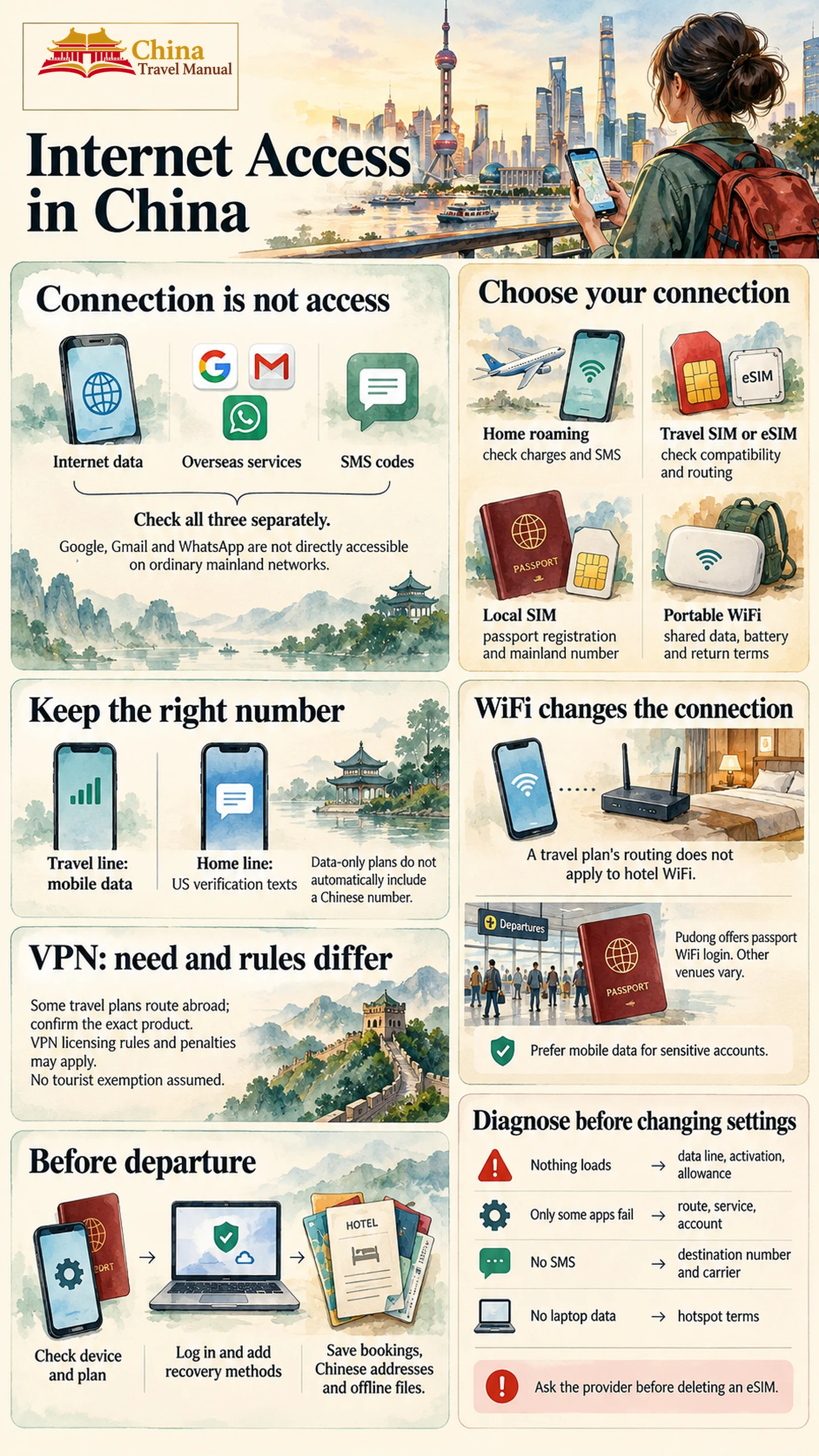
A phone connection matters well beyond browsing: you may need it to locate a pickup point, open a reservation or contact your hotel. Include connectivity in your China trip planning before you finalize arrival arrangements. This guide covers mainland China, with separate guidance for Hong Kong and Macau. Service conditions were checked on October 29, 2026; confirm current device, coverage and plan terms before buying.
Which Apps and Websites Work in Mainland China?
Google services, YouTube, Facebook, Instagram and WhatsApp are not directly accessible through ordinary mainland internet connections. This includes the usual assumption that Gmail or Google Maps will work once you connect to hotel Wi-Fi.[1]
| Service or task | What to plan for |
|---|---|
| Google Search, Gmail and Google Maps | Do not depend on direct access through a mainland connection. Save important email and choose a locally usable navigation tool. |
| WhatsApp, Instagram, Facebook and YouTube | Arrange another way to reach travel companions, your hotel and family if these services are unavailable. |
| Local messaging, payments and navigation | Prepare the relevant apps before departure. Successful installation does not complete account verification or payment setup. |
| Booking, banking and airline accounts | Keep confirmations offline and prepare account recovery. A service can have its own regional or security restrictions. |
Two different problems can look identical. A network may restrict a website, while a bank or platform may separately challenge an unfamiliar login. Changing your data connection cannot guarantee that an account security check will disappear.
Choose your essential China travel apps before departure, and check language and offline features on your actual phone. Our China map app guide covers navigation choices. Do not assume that a map loading successfully means its local listings, entrances and routes are equally useful.
Choose Your Main Internet Connection
Choose by device compatibility, the services you need, phone-number requirements and the total cost for your trip. The physical format of a SIM does not determine where its internet traffic exits or which services will work.
| Connection | When it fits | Check before committing |
|---|---|---|
| Home-carrier international roaming | You want to keep using your existing line with minimal setup. | China coverage, daily charges, high-speed allowance, calls, SMS and hotspot terms. |
| Travel SIM or eSIM | You want a separate mobile data plan ready for arrival. | Unlocked compatible phone, routing, activation policy, validity, identity checks and whether calls or texts are included. |
| Local Chinese SIM | You need a mainland number or a local voice-and-data package. | Passport registration, device compatibility, available plans and the outlet’s opening hours. |
| Hotel or public Wi-Fi | You need a connection at a particular building or terminal. | Login method, availability, security and which services are accessible. |
| Portable Wi-Fi router | Several devices need a shared connection while traveling together. | Supported devices, routing, battery life, hotspot limits, collection, return and damage terms. |
For a short independent trip, first compare roaming with a travel data plan. A local number becomes more useful when your actual bookings or daily services require one; trip length alone does not make it necessary. A shared router can suit a group, but companions lose that connection when they separate.
Foreign visitors can bring a passport to service centers of China Mobile, China Unicom or China Telecom to obtain a SIM. Packages vary; confirm voice, SMS and data rather than assuming every plan includes the same benefits.[2]
A travel eSIM and a mainland carrier’s local eSIM are different products. For a US-purchased eSIM-only phone, do not assume you can obtain a mainland carrier profile after arrival. Check the exact model, purchase region and carrier eligibility. An unlocked phone is required to use another carrier’s travel eSIM on iPhone.[3]
Use our roaming, SIM and eSIM comparison to weigh the alternatives. For purchase requirements, see the China SIM card guide. Device and plan checks are covered in the China travel eSIM guide.
Mobile Data, Phone Numbers and Verification Codes
Think of mobile data and phone numbers as separate services. A data-only travel plan provides internet access; it does not automatically give you a mainland number or receive texts addressed to your US number.
- Your US number: Bank or account codes sent to that number still depend on your home line. Ask the carrier about SMS reception in China, roaming charges and whether any alternative SMS arrangements are supported in China. Do not assume Wi-Fi Calling is available there.
- A mainland number: This can receive codes addressed to that number when SMS service is enabled. Some local services restrict registration to mainland numbers.
- An overseas number: This can still receive a platform’s code if that platform supports international numbers and delivery succeeds. It cannot receive a code addressed to a different, Chinese number.
On a compatible dual-SIM phone, you may keep your home line enabled while using a separate travel line for data. Keeping the line on is different from enabling data roaming on it; ask your carrier how to retain SMS without unwanted data charges.[3]
Before deciding whether you need a Chinese phone number, check the services you actually intend to use. A local SIM is not a general entry requirement, and it cannot replace a US number already registered with your bank. Add a supported authenticator, recovery email or backup code before leaving.
Using Hotel and Public Wi-Fi
Wi-Fi authentication varies by venue. You may receive a password, use a room-based login, enter an SMS code or verify a document. Connecting to the network name alone may not finish the login process; open the venue’s genuine sign-in page and follow its instructions.
At Shanghai Pudong Airport, official guidance describes scanning the passport photo page on the Wi-Fi login page to connect without a Chinese SIM. The airport also lists mobile-service assistance for arriving travelers. This is a specific service, not a nationwide airport rule.[4]
For hotels, ask before arrival whether an overseas guest can log in without a mainland number. If the page will not accept your number, ask reception for the supported alternative. Do not assume that an international hotel brand, room category or star rating determines its authentication method.
Public Wi-Fi is an availability backup with security trade-offs. Current US travel advice recommends avoiding public Wi-Fi networks. Prefer mobile data for sensitive account access, and do not install an unfamiliar certificate or app merely because a login page requests it.[5]
Our Wi-Fi in China guide covers access in more detail. Remember that a phone using a travel data plan switches to the venue’s internet connection when it joins Wi-Fi.
Do You Need a VPN in China?
A VPN is not required simply to get online or use locally accessible travel services. If you need an overseas service that does not work on your current connection, check both your connection’s capabilities and the applicable rules before choosing another arrangement.
Some travel data products use international roaming routes through gateways outside mainland China. Their providers may state that particular overseas services work without a separate VPN. That is a product-specific routing claim, not an inherent feature of every eSIM, and it does not extend to hotel Wi-Fi.[6]
Legal permission is a separate question. UK travel guidance says VPN services need Chinese government licensing. US travel guidance states that VPN use is illegal in most cases and warns of possible penalties. Neither statement establishes a tourist exemption.[5][7]
Do not interpret a product’s ability to connect as proof of legal authorization, or a travel anecdote as a guarantee about enforcement. Check current official guidance and your provider’s terms. If essential communication depends on a particular service, prepare an alternative contact method and offline information rather than relying on one tool.
What to Set Up Before You Fly
Complete account preparation while you still have your usual phone service and reliable access to your email. Use this sequence to avoid discovering a dependency only after landing.
- Check the device: Confirm the exact model, purchase region, SIM format and carrier lock. On iPhone, look under Settings, General, About for the carrier-lock status; an unlocked device shows “No SIM restrictions.”[3]
- Read the plan rules: Check destination coverage, validity start, installation deadline, high-speed limits, top-ups, hotspot and support. Installation and the start of paid validity may be different events; follow the selected plan’s policy.
- Prepare essential accounts: Install updates and sign in to airline, accommodation, email, banking and travel apps. Complete any required verification before departure. An existing login may help, but it cannot prevent every later security check.
- Arrange recovery: Add supported backup verification methods. Keep recovery codes securely available without depending on the same email account you might be locked out of.
- Save usable offline files: Download booking PDFs, hotel names and addresses in Chinese, contacts and supported map or translation downloads. Open them in airplane mode to check that they are stored locally.
- Keep support details: Save the provider’s instructions, order reference and contact channels. Include a contact method you can use if the provider’s app is inaccessible.
- Test after arrival: Select the intended data line and test navigation, a booking and your contact method before leaving the terminal. Check SMS separately if you expect an important code.
Do not switch on roaming indiscriminately: a travel eSIM may require data roaming on its own line, while your home line could incur charges. Follow the instructions for each line. Our offline travel preparation guide and account and device preparation guide cover the supporting details.
What to Do When Your Connection Stops Working
Identify the symptom before changing settings. A failed app, an expired package and a missing text message require different checks.
| Symptom | First checks |
|---|---|
| Signal bars, but nothing loads | Check the selected data line, package activation, allowance and required roaming or APN settings against provider instructions. |
| Only some apps fail | Check the current network route, service availability and account alerts. This does not prove that your entire data plan has failed. |
| Apps stop after joining hotel Wi-Fi | Disconnect Wi-Fi and test the mobile plan. The two connections can have different routing and restrictions. |
| Data works, but no verification code arrives | Check the destination number, the relevant line’s SMS service and whether the platform supports that number. |
| Phone works, but laptop hotspot fails | Check tethering permission, shared-data limits and device settings. |
| No connection can be restored | Use saved provider instructions and a working backup contact method; ask an official airport service desk or hotel reception for assistance. |
Do not delete an eSIM as an early troubleshooting step. Some profiles cannot simply be downloaded again with the original QR code. Ask the provider before removing it, especially if it is your only mobile connection.[8]
If an issue needs detailed settings changes, follow our China travel eSIM troubleshooting guide. Avoid changing several settings at once: record the original setting and test after each provider-directed adjustment.
FAQs About Internet Access in China
Can I use WhatsApp and Gmail in China?
Do not expect direct access on ordinary mainland mobile networks or hotel Wi-Fi. Some international roaming or travel data products support access through a different route; confirm the exact plan and retain another contact method.
Can I travel in China without a local SIM card?
Yes. A suitable roaming or travel data plan can provide connectivity without a local SIM. You may still need a mainland number for a particular service, so check your bookings rather than assuming every platform accepts overseas numbers.
Can I connect my laptop through my phone?
Only if your device and plan support a personal hotspot. Check any tethering allowance or speed limit before buying. The laptop shares the phone’s mobile data connection, not an unlimited separate allowance.
Will one data plan cover mainland China, Hong Kong and Macau?
It can, if all three are explicitly included. A “China” label alone is insufficient. Check the destinations individually, and use our Hong Kong internet guide and Macau internet guide for local arrangements.
Sources
[1] Ministry of Culture and Tourism. SIM Cards & Networks
[2] Hunan Provincial Government. How to Apply for a SIM Card and Activate Mobile Communication Services in China
[3] Apple Support. Use eSIM while traveling internationally with your iPhone
[4] Pudong New Area Government. Pudong airport upgrades international traveler services
[5] US Department of State. China Travel Advisory
[6] Airalo Help Center. Stay Connected in China: Your Guide to Unfiltered Internet Access (Is a VPN Required?)
[7] UK Foreign, Commonwealth & Development Office. China travel advice: Safety and security
[8] Airalo Help Center. Can I reinstall an eSIM?