

Quick Answer: Can Foreign Visitors Use DiDi in China?
Yes. Foreign visitors can use DiDi ride-hailing in mainland China without automatically needing a Chinese phone number or bank account. The standalone DiDi China app supports international mobile-number registration, English-language service and some international cards. Ride-hailing is also accessible through Alipay and WeChat, although the provider and features can differ by entry point.[1][2]
- Phone verification: Keep a number that can receive the registration code; a data-only travel eSIM does not itself provide SMS service.
- Working internet: Arrange mobile connectivity for booking, tracking and messaging your driver after leaving Wi-Fi.
- Usable payment: Check the available payment methods in your chosen booking channel; supported does not mean every overseas card will work.
Set these up before your first ride, then confirm the pickup pin and car plate before getting in.
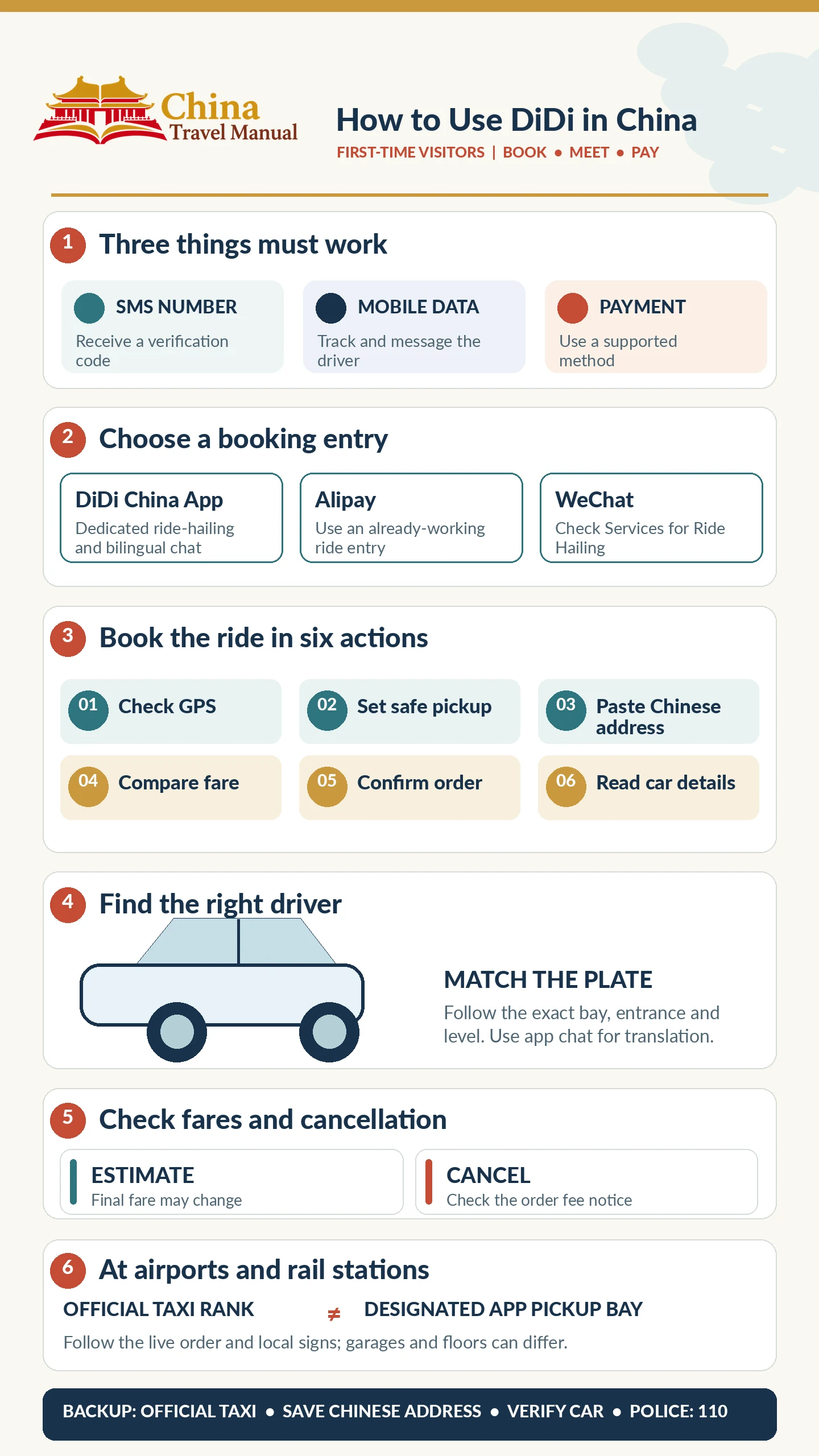
Using DiDi in China is straightforward once your account and payment work, but the tricky parts often happen outside the booking screen: a hotel with several entrances, a station with separate pickup garages, or a driver calling in Chinese. This guide walks through your first request, pickup, fare and backup plan. For a broader comparison of trains, metros, taxis and other options, see getting around China.
DiDi App, Alipay or WeChat: Which Booking Method Should You Use?
Use the booking method you can actually sign into and pay through, not necessarily the one with the longest feature list. China’s official visitor guidance describes three ride-hailing routes.[1]
| Booking route | Most useful when | What to check |
|---|---|---|
| DiDi China app | You want a dedicated ride-hailing app with trip details and bilingual messaging | Install the mainland-facing app, register, and verify your payment options |
| Alipay ride-hailing | Your Alipay account and its payment method already work | Open Transport or the ride-hailing service; verify the provider and charge method shown |
| WeChat ride-hailing | You already use WeChat Services and an available payment method | Open Services and the ride-hailing entry; options vary by account and location |
The Alipay and WeChat entries are service channels, not a guarantee that every ride will be operated by DiDi. Check the provider displayed before placing the order. If you need help with the wallet itself, use our Alipay guide or WeChat Pay guide; this article concentrates on booking and completing the ride.
What to Prepare Before Your First DiDi Ride
Do these checks before leaving the United States, while you can still resolve a bank or phone problem comfortably:
- SMS number: Keep your US +1 number able to receive verification messages. If you plan to use a data-only eSIM in China, keep a separate SMS-capable line available. Receiving a code may depend on your carrier and account.
- Mobile data: Arrange usable data in mainland China. A Wi-Fi connection at your hotel is not a reliable substitute for connectivity beside a road or station pickup zone; consult internet access in China.
- Correct service: Install the verified mainland-facing app or set up a functioning Alipay/WeChat ride-hailing entry.
- Payment backup: Have a supported card or wallet and a different way to get to your destination if payment fails. See how to pay in China.
- Exact destination: Save the hotel’s simplified-Chinese name, full address and entrance information, not just its English brand name.
A working SMS line, mobile data and a successful card charge are three different capabilities. Testing one does not prove the other two will work. For the phone-number distinction, read whether tourists need a Chinese phone number.
How to Download and Set Up DiDi China
Install the Correct App for Mainland China
On iPhone, use the official DiDi China: Ride Hailing App Store listing. On Android, check the official DiDi China Google Play listing. Confirm the developer and supported region in the store rather than trusting an unfamiliar download site or a similar-looking icon. App availability can vary with your store region and device.[2]
A DiDi account or app you have used in another country should not be assumed to offer the same China mainland booking services. Select the mainland-capable product or an official ride-hailing entry inside your existing wallet.
Register With a Foreign Number and Set the Language
Open the app, choose the country code for your number (such as +1 for a US number), enter the number and follow the code-verification prompts. Select mainland China when the app asks for a service region. If the interface is not in English, look for the language choice under your account and settings; the labels may move as versions change. A Shanghai government walkthrough demonstrates an English-language setting path, but it is not a permanent screenshot of the current version.[3]
Do not assume an eSIM that supplies only internet data can receive the verification text. Keep your ordinary SMS line available if that is where codes arrive.
Add and Check a Payment Method
Open payment settings for the booking channel you have chosen and add one of its currently supported options. The standalone app advertises international bank-card support; Alipay or WeChat-based rides can use the eligible wallet payment methods shown for that order.[2][3]
Check whether your account displays a usable payment method before requesting a driver. Adding a card successfully is not proof that every future transaction will clear issuer verification or platform risk checks. If a card repeatedly fails, try an independently configured eligible payment channel rather than submitting the same order many times.
How to Book a DiDi Ride Step by Step
Once your account, connection and payment are ready, use this sequence for a normal city ride:
- Open DiDi China or your chosen Alipay/WeChat ride-hailing entry and allow location access when needed.
- Check the proposed pickup point. Move the pin or choose a named entrance if GPS places you across the road, on an elevated road or on the wrong level of a complex.
- Enter the destination. Paste the full simplified-Chinese address when English search is ambiguous, and confirm the map points to the correct hotel branch or attraction entrance.
- Compare the vehicle categories available for this trip, their displayed fare estimates and expected pickup times. Names and available services differ by city and channel.
- Review pickup, destination, payment and service choice before confirming the request.
- Wait for a driver match, then read the driver’s location, vehicle information and any pickup instructions on the live order screen.[3]
The pin and the street-level pickup location are not always equivalent. For example, the correct hotel can still have separate front and rear driveways. If the pickup position is unsuitable, correct it before sending a request rather than asking the driver to stop in an unsafe location. For addresses and navigation choices, see map apps for China travel.
How to Find Your Driver and Start the Ride
Confirm the Exact Pickup Point
Follow the location named by your order, not just the moving GPS dot. A shopping center can have street-level and basement pickup areas; two sides of a divided road may require a long detour for a car. If the location has numbered bays, use the exact bay shown in the app and on signs.
If the car seems to have arrived but you cannot see it, check the direction of traffic, entrance name and garage level. Send a short landmark or a photo through the in-app chat when that feature is available. Do not cross a busy road or enter a restricted vehicle lane just to reach the driver.
Match the Car and Communicate With the Driver
Before entering, compare the license plate and vehicle details with the confirmed order. Do not enter a vehicle whose identifying information does not match. Some pickups also require the passenger to confirm a portion of the registered phone number; follow the current on-screen instructions.[3]
The official app advertises English–Chinese message translation, which can be more useful than a voice call when neither party speaks the other’s language. It may still mistranslate a landmark or garage level.[2] A practical message is: “I am at the north entrance, beside the information desk.” Include the saved Chinese location name if available. For a wider communication toolkit, see traveling in China without speaking Chinese.
How DiDi Fares, Payments and Cancellations Work
Understand the Fare Estimate and Possible Extra Charges
Treat the price displayed before ordering as an estimate unless that particular service explicitly states a fixed price. The final amount may differ due to the service’s fare rules, road tolls, parking, waiting time, route changes or demand-based pricing. Which charges apply depends on the city, vehicle category and order conditions.
A regular metered taxi may be less expensive than a higher-tier or surge-priced app ride; neither is always cheaper. Compare the actual app estimate with a plausible metered taxi alternative rather than relying on a national price rule.
Complete Payment and Review the Trip
Check the payment method attached to the order before boarding. Depending on the channel and account, a fare may be charged automatically, require confirmation, or involve a temporary authorization. Do not assume every ride settles identically. After arriving, open the completed trip to review the final fare and any applicable breakdown; compare the displayed payment status with your card or wallet records.[3]
If the transaction fails or appears twice, retain the trip details and contact the platform through its official support route. The separate China payment problems guide covers broader bank and wallet troubleshooting.
Check the Cancellation Rules Before Cancelling
A ride request is not universally free to cancel. Whether a fee applies can depend on how long the driver has been assigned, their progress, the booking type and the specific order. Review the cancellation notice shown for that trip before confirming.
If a driver asks you to cancel, inspect the order status and use the official in-app process rather than agreeing to a private settlement. If a pickup cannot be completed, keep the order record and use customer support to dispute a charge you believe is incorrect. Do not assume a delayed driver automatically gives you a free cancellation.
Using DiDi at Airports and Railway Stations
Airport Pickup Areas
Airports often separate official taxi queues from ride-hailing pickup zones. The approved DiDi collection point may be in a garage or on a different floor from the arrivals exit. Match the airport and terminal first, then follow the current order’s pickup instructions and official signs. Do not wait beside an airport traffic lane merely because the map pin looks close.
For selecting between DiDi, metro, airport buses and other arrival options, use our airport and station transfer guide. Detailed examples include Beijing Capital Airport, Beijing Daxing Airport and Shanghai Pudong Airport.
High-Speed Railway Station Pickup Areas
At large rail hubs, an ordinary taxi rank, private-car entrance and ride-hailing garage can be different places. Shanghai Hongqiao Railway Station’s August 2026 upgrade provided markings toward four ride-hailing pickup points, including a point in Parking Lot 10 (P10); it did not make P10 the single universal pickup for everyone.[4]
Always follow the location associated with your live order and the station’s latest signs. If you arrive at Shanghai Hongqiao, the Hongqiao Railway Station guide provides the broader station context.
When DiDi Does Not Work: Problems and Backups
A failed request does not automatically mean foreign phone numbers are blocked. Diagnose the affected step, then switch to a legitimate transport option if the failure cannot be resolved safely.
| Problem | Check first | Next action | Backup |
|---|---|---|---|
| Registration code never arrives | Country code, SMS-capable line, roaming or carrier blocks | Retry after checking your number; use an already functioning wallet entry if available | Official taxi queue |
| Foreign card fails | Supported card type, issuer verification, selected payment channel | Try another eligible card or a configured wallet | Official taxi with accepted payment |
| Mobile data stops working | Roaming/eSIM activation and signal | Use your saved Chinese address and ask staff for help | Official taxi or service desk |
| Pickup pin is wrong | Roadside, entrance, level and named bay | Adjust a safe pickup point before booking or follow in-app modification options | Designated taxi rank |
| Driver cannot find you | Order’s pickup area and available chat | Message a landmark or bay number; assess cancellation notice before cancelling | Official taxi queue |
| Driver asks you to cancel | Order status and displayed fee notice | Use official support and cancellation workflow | A different legitimate service |
| No driver accepts | Area, time and available categories | Retry where permitted or compare another service | Metro, bus or official taxi |
| Fare fails or seems duplicated | Trip receipt, card/wallet statement and order status | Save screenshots and open an in-app support request | Resolve payment through official support |
Keep the destination written in Chinese and have a way to pay for an ordinary taxi before you rely on ride-hailing for a late arrival. An offline travel preparation checklist is useful when mobile data fails.
Ride Safety and Getting Help
Use the approved pickup location, compare the plate and vehicle with your live booking, and do not board an unverified car. If your app supports trip sharing, send your route to a trusted contact; preserve the digital order for lost property, fare questions or a complaint.
The official DiDi China listing advertises in-app bilingual customer service around the clock, but availability of immediate assistance can vary with the incident and connection.[2] Use the in-app trip record or customer-service channel for ordinary ride disputes. For immediate danger in mainland China, call the police on 110 rather than depending on an app button alone.[5] Our China travel safety guide covers more general precautions.
FAQs About Using DiDi in China
Do I Need a Chinese Phone Number to Use DiDi?
No. The DiDi China app supports international-number registration, including a US number, provided verification succeeds. A data-only eSIM supplies internet but no SMS number by itself. Keep an SMS-capable number available for account checks.[2]
Can I Pay DiDi With a US Credit Card?
Potentially. International cards are among the advertised payment options, but acceptance of a specific US card and successful transaction depend on the account, card and verification checks. Prepare a separate eligible payment backup rather than assuming all US cards will work.[2]
Is DiDi Cheaper Than a Regular Taxi in China?
Not always. The quoted price depends on city, distance, demand and vehicle category. An ordinary DiDi ride can be competitive with a taxi, but high-demand pricing or a premium vehicle may cost more. Compare the live estimate instead of relying on a fixed national rule.
Can I Book a DiDi Ride in Advance?
If a reservation or scheduled-ride option appears for your city and selected service, follow its booking conditions. Availability varies, and a scheduled request does not guarantee a driver will arrive at the exact time. Keep a second transport plan for critical departures.
What if My Driver Calls Me in Chinese?
Try responding through the in-app messaging feature and include the pickup landmark in simplified Chinese. Translation helps but may be imperfect. Confirm the correct pickup area; if you still cannot communicate, use the official order and cancellation tools rather than entering an unverified vehicle.
Sources
[1] State Council of the People’s Republic of China. Guide to Working and Living in China — Online Ride-Hailing Services
[2] DiDi China. DiDi China: Ride Hailing — App Store
[3] Shanghai Municipal Government. How to Use DiDi Chuxing
[4] Shanghai Municipal Government. Shanghai Hongqiao Railway Station Upgrades E-Hailing Service
[5] Beijing Municipal Government. Emergency Numbers