

Quick Answer
Install the official AMap Global app, select English if your version offers a language choice, and test your hotel address before departure. For a reliable route, paste the property’s Chinese name or address, match the district and select the exact entrance or pickup point. The app supports walking, transit, cycling and driving routes.[1][2][3]
- Look for the right listing. Match the developer to AutoNavi and check the app’s available languages.[1][2]
- Check the pin before moving. Confirm the branch, building and entrance with your booking.
- Keep a backup. Save the Chinese address and the exit or pickup instructions you may need without a connection.
Live ride booking and traffic updates still depend on a working connection.
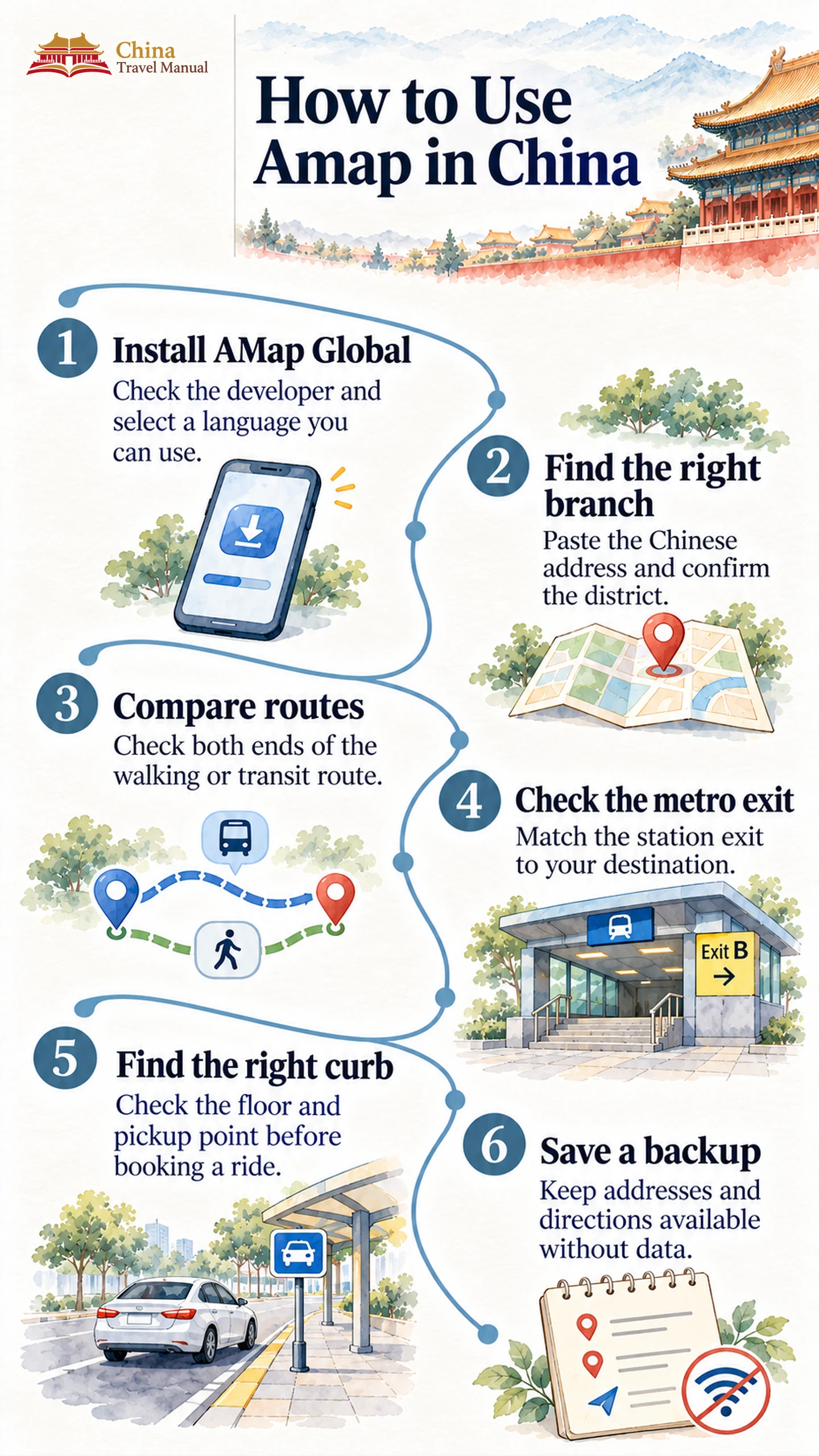
Start by planning one real trip from the airport or railway station to your hotel. That test tells you whether you can find the right branch, identify the station exit, and open the destination details when your phone has no data.
Install AMap Global and Set the Language
Look for AMap Global from AutoNavi in your app store. The official app is listed for iPhone and Android, although availability and menus can vary by market and version. Check the language on your device and look in the app settings if needed. Shanghai’s official visitor guide confirms English support and offers examples of route and taxi functions. English menus do not guarantee every place name or instruction will appear in English.[1][2][3]
Give the app access to your location while using it if you want directions from where you stand. You can also enter a named starting location to plan in advance. Open a test route and see whether the functions you need prompt for sign-in. Saving destinations, ordering a ride and browsing a route can have different requirements. The China travel apps guide helps you identify what else to set up before departure.[3][4]
How to Find a Route in AMap
- Search for the Chinese name and city. Paste the name or full address from your booking and add the city or district if the search shows several matches.
- Open the correct branch or entrance. Compare the result’s street and building with your booking. At a mall, station or park, confirm which door, gate or exit you need.
- Compare the travel modes. Enter the start and destination, then compare walking, transit or driving routes. Read the first and last leg before following the estimated time.[3]
- Save the part you may need offline. Capture the address, nearest metro exit and a nearby landmark, and put this information where it opens without data.
If several pins look similar, use the Chinese address guide to compare road names and street numbers. Ask your host to send the Chinese name and address together. A saved note is useful when a Chinese place name stays untranslated even with the app in English.
Use the Metro Exit and Walking Directions
Read the route all the way through. A transit suggestion includes a walk to the station, the line direction and transfers, and a final walk from an exit. Confirm the station name and the direction of the train against the platform sign. When you arrive, use the numbered or lettered exit shown on the route and check whether it is actually open. If you need a lift, confirm the accessible exit on the station map or ask staff.[3]
Two station entrances can be on opposite sides of a wide road. If the walking route starts from the wrong side, move the starting point to the door where you are standing. Use marked crossings and follow local signs when a route leads toward a closed gate or an unsuitable crossing. At a railway station, compare the complete station name and the arrival or departure level with your ticket. The China railway stations guide covers that handoff.
For a busy attraction, confirm its visitor entrance separately. A nearby pin can lead to the visitor center or a service gate. When the entrance is in a different place from the main attraction, search for the entrance or copy the pin the operator provides.
Set a Ride Pickup Point You Can Reach
Where the ride feature is offered, check the proposed pickup point, destination and terms before ordering. At an airport or railway station, follow signs for authorized pickup and make sure the pin is on the correct floor and road. At a mall or hotel, use an entrance you can describe to a driver. A map showing two pins close together in plan view can still hide a different level.[3][5]
Confirm the vehicle registration and pickup location in the app before boarding. If the assigned point is unreachable, use the app’s pickup instructions or contact the driver before paying to reorder. Keep the Chinese address available if you need to use a staffed taxi rank. The ride pickup point guide has examples of choosing a curb and terminal floor.
Plan for a Weak or Missing Connection
If your version offers offline map downloads, download the areas you need and test a familiar route with Wi-Fi and mobile data turned off. Check for anything that still requires a connection, especially live traffic, current schedules, search and ride booking. Save the Chinese address and your station exit independently of the map. The China Wi-Fi guide can help if your connection fails at a hotel or airport.
For the first day, save the destination in two forms, such as a readable screenshot and a copyable text note. If AMap cannot locate you, use a numbered entrance, a street sign or a staffed counter to establish where you are. Compare another option in the China map apps guide if you need a different source for your route.
FAQs About Using AMap in China
Is AMap available in English?
AMap Global offers English in its official listings and in Shanghai’s guidance. Some local names or services can still appear in Chinese, so keep the exact Chinese address available.[1][2][3]
Can I use AMap for walking and metro directions?
Yes. Select the mode that matches your journey, check the transit line and exit, and cross-check current signs and closures as you go.[3]
Does AMap work offline?
Test the downloaded area and the exact function you need in your version. Save separate copies of important addresses, exits and pickup details. Live updates and a new ride booking still depend on a working connection.
What if AMap shows the wrong hotel branch?
Paste the Chinese address and city, then compare the district, building number and full hotel name with your reservation. Ask the property for a pin or for the name of the nearest entrance if the listing still looks wrong.
Sources
[1] AutoNavi via Apple App Store. AMap Global for iPhone and iPad
[2] AutoNavi via Google Play. AMap Global for Android
[3] Shanghai Municipal Government. A guide to using AMap in English
[4] Shanghai Municipal Government. Digital map services for international visitors
[5] Shanghai Municipal Government. Multilingual map and ride-hailing features