
Quick Answer: What Is the Best eSIM for China Travel?
For most first-time US visitors with an unlocked, eSIM-compatible phone, an international travel eSIM that explicitly covers mainland China is a practical way to get mobile data. Choose by coverage, high-speed data allowance, validity, international app access and hotspot terms—not by the word “unlimited” alone.
- Check your phone: Confirm eSIM support and that your device is carrier-unlocked before paying.
- Check the data route: Some international roaming eSIMs support Google, Gmail and WhatsApp without an additional VPN; do not assume every China eSIM works that way.
- Check destinations: Mainland-only plans do not automatically include Hong Kong or Macao.
- Keep your US number: Where your phone supports dual SIM, use the travel eSIM for data and your US line for any essential SMS verification, subject to home-carrier roaming rules.
- Prepare offline backups: Save your hotel address, bookings and directions before departure.
Most basic travel eSIMs are data-only: they do not give you a Chinese +86 phone number or ordinary SMS service.[1][2]
A China travel eSIM is not the same product as an eSIM from China Mobile, China Unicom or China Telecom. Domestic carrier eSIM activation has different supported-device and identity-check rules, as Apple explicitly explains.[1][3]
An eSIM can make traveling across mainland China easier, but the name on the package does not tell you whether it includes a phone number, how it routes data or which destinations it covers. This guide focuses on choosing and using an international travel eSIM with a US phone; for a broader comparison with home-carrier roaming and local physical SIMs, see roaming versus SIM versus eSIM in China. Product terms and prices were reviewed on October 28, 2026, and may change.
How to Choose the Right China eSIM Plan
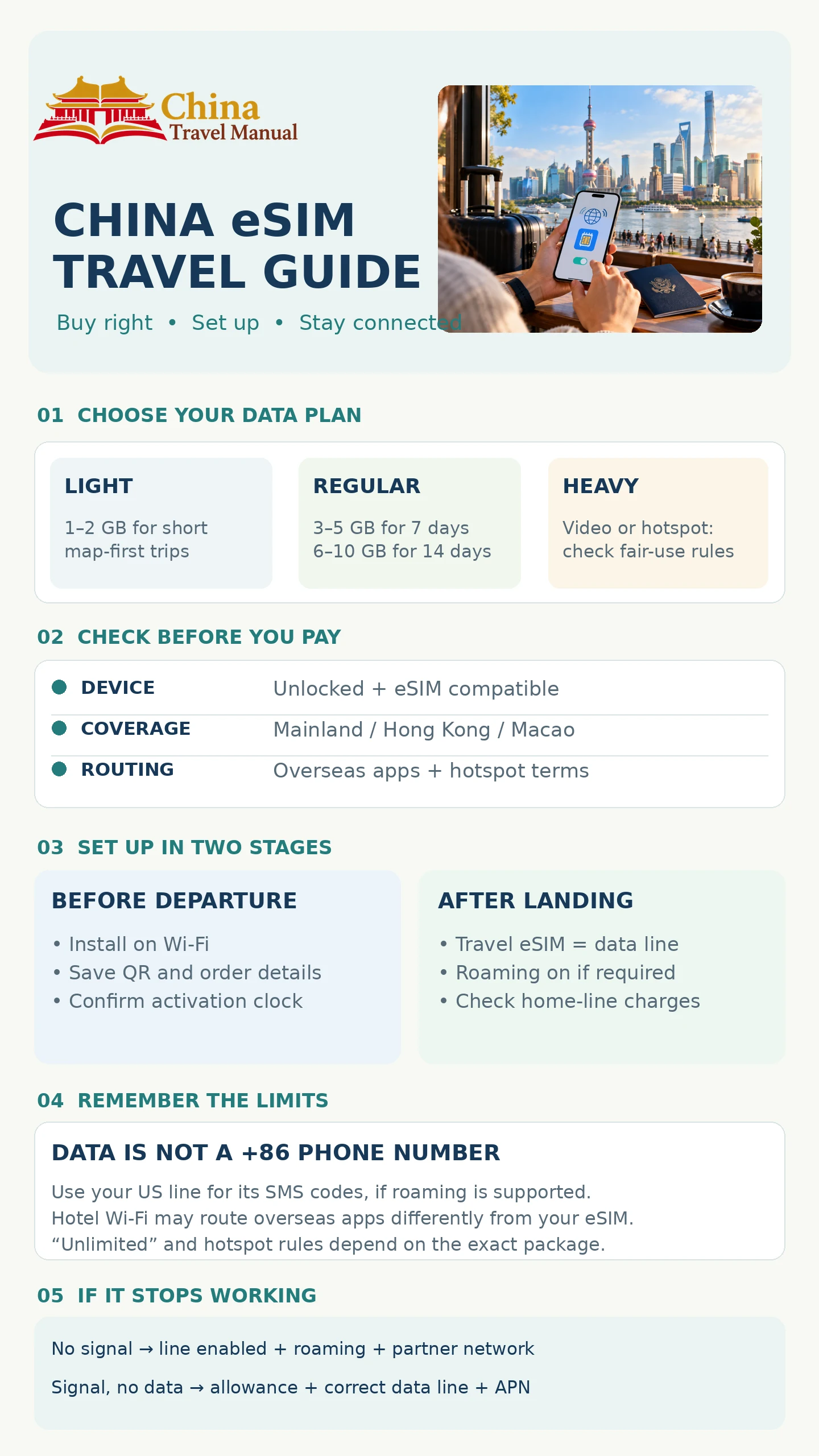
Start with the tasks you will use data for. A solo visitor following maps and paying at stores needs less than a traveler uploading videos or tethering a laptop. Check the package’s validity, destination list, hotspot allowance, top-up options and refund conditions before comparing prices.
| Plan type | Best fit | Check before buying |
|---|---|---|
| Small fixed-data plan | Short visits, maps, messaging and payments | What happens when the data runs out |
| Larger fixed-data plan | One- or two-week trips with browsing and uploads | Whether unused data expires and top-ups are offered |
| “Unlimited” plan | Frequent video, calls or tethering | Fair-use speeds and any separate hotspot limit |
| Regional Asia plan | Mainland China plus Hong Kong, Macao or other countries | The exact included destinations and data routing |
| Data plus phone-number plan | Travelers needing actual calls or SMS | The number’s country code and supported verification services |
Illustrative provider prices checked October 28, 2026: Nomad displayed 1 GB/7 days for US$4 and 10 GB/30 days for US$17 on promotion; Airalo displayed 1 GB/3 days for US$4 and 10 GB/30 days for US$26.50; Saily displayed 1 GB/7 days for US$4.49 and 10 GB/30 days for US$26.99. These are displayed online plan prices, not guaranteed quotes or endorsements. Check taxes, current promotions and terms directly before purchase.[4][5][6]
For a three-day city break, a small plan can work if video and automatic backups stay off. For a week of regular navigation and browsing, a 3–5 GB plan is a more forgiving starting point than 1 GB. A longer trip or a phone used as a hotspot usually warrants more data. “Unlimited” does not necessarily mean unlimited high-speed data; some products reduce speed after a daily allowance. The restriction and its threshold are provider- and plan-specific.[4][7]
How Much Data Do You Need for a China Trip?
Instead of buying strictly by trip length, estimate how many hours you will navigate, make video calls or upload media while away from Wi-Fi. Payments and ordinary text messages usually use little data; video, photo backups and tethered laptops can consume far more.
| Travel style | Illustrative data allowance | Typical behavior |
|---|---|---|
| Light | About 1–2 GB for a short trip | Maps, QR payments, occasional messages |
| Regular | About 3–5 GB for seven days; 6–10 GB for 14 days | Daily navigation, bookings, browsing, some photo uploads |
| Heavy | 10 GB or more, or a carefully checked unlimited plan | Long video calls, streaming, hotspot or cloud synchronization |
These are planning allowances, not measured usage guarantees. Map navigation is often relatively light, but searching new routes, downloading map tiles and background app traffic change consumption. Video quality can make a much larger difference: a call or high-definition stream may consume hundreds of megabytes or more in a session. A companion connecting by hotspot adds their own usage; it does not simply double every trip’s consumption.
For a practical seven-day example, someone using maps daily, messaging and uploading selected photos might plan around 3–5 GB, then add a margin if they expect video calls. For 14 days with similar habits, 6–10 GB is a reasonable comparison range. Turn off unnecessary cellular photo backup and large automatic updates if your allowance is limited. More preparation tips are in the offline travel preparation guide.
Will a China Travel eSIM Work on Your Phone?
iPhone Compatibility and Carrier Lock
Apple says an iPhone XS, XS Max, XR or later can use supported travel eSIMs, subject to the specific model and carrier. On a US iPhone, open Settings → General → About → Carrier Lock. “No SIM Restrictions” means it is unlocked; a carrier-locked phone may not accept a competing travel eSIM. You must also check the travel provider’s supported-device list.[1]
US iPhones may use a physical home SIM plus a travel eSIM, or two eSIMs on compatible models. Some US models are eSIM-only, so the exact setup varies. You can retain your home number for calls or texts while selecting the travel eSIM as the mobile-data line. Apple warns that the home line can still incur roaming fees even when the travel line handles data.[1]
Do not confuse this with mainland carrier activation. Apple lists specific China-market iPhone models for local China Mobile, China Telecom and China Unicom eSIM profiles and requires activation at the carrier’s local store with identity checks. A US-purchased phone that accepts a travel eSIM cannot automatically install a mainland carrier’s eSIM.[3]
Samsung, Google Pixel and Other Android Phones
Many recent unlocked Galaxy S/Z-series phones and Pixel models support eSIM. However, model region, firmware and carrier restrictions can change what works; a phone brand or series name alone is insufficient. Samsung explicitly cautions that supported models vary by country of origin, and Google notes that a carrier-sold Pixel can be SIM-locked.[8][9]
Look for Add eSIM or Add mobile plan under your phone’s SIM settings, then verify the exact model and carrier status against the provider list. On Galaxy phones, this is commonly under Settings → Connections → SIM manager; on Pixels, look in Network & internet → SIMs. Menu labels change with software versions. A visible menu is helpful evidence, not a substitute for confirmation that the phone is unlocked.
How to Install and Activate a China Travel eSIM
Set Up the eSIM Before Leaving the US
When you have reliable Wi-Fi, purchase the selected plan from the provider’s official site or app and follow its instructions to add the eSIM by QR code, app installation or manual activation details. Save the receipt, support contact and activation instructions. Label the two lines “US Number” and “China Travel” to avoid selecting the wrong one later.
Installation, activation and expiry are different events. An eSIM profile can be downloaded before departure, while the data allowance starts only when the provider’s activation trigger is met. Nomad currently says its listed China plans start when connecting to the destination network, but they must be activated within 60 days of purchase or may start automatically. Saily’s current terms describe a 180-day activation period for regular plans, with different rules for subscription plans. Read your exact confirmation rather than assuming every brand follows one clock.[4][6]
Install before departure when the provider allows it: arriving without internet can make downloading a profile or finding an email QR code difficult. Do not delete a profile casually; replacement QR codes and reinstall rules vary. Detailed recovery belongs in the China eSIM installation troubleshooting guide.
Turn On Your Travel Data After Arriving in China
Once your flight lands, enable the travel eSIM and select it as your default mobile-data line. Turn on Data Roaming for the travel eSIM if its instructions require it; many international travel eSIMs need roaming enabled to use their partner network in China. Confirm the network registers and open a small website before leaving the airport.[4][6]
If you are retaining your US line to receive account codes, disable data roaming on that home line and consider disabling automatic cellular-data switching. Your US provider may still charge for incoming calls, outgoing texts or roaming services depending on its plan. Check its rates in advance—receiving SMS is not universally chargeable or universally free. Some phones support simultaneous active eSIMs; others have different active-line limits.[1]
A preinstalled destination eSIM may show No Service while you are still in the US. That is not necessarily a failure: it may only register when a partner network becomes available in mainland China. Do not treat a missing US signal as proof of incompatibility.
Can You Use Google, WhatsApp and Other Apps with a China eSIM?
An eSIM is a digital SIM profile, not inherently a VPN or a universal way around network restrictions. What matters is where your provider routes mobile data. Airalo and Nomad state that their relevant China roaming products route traffic through international gateways, making services such as Google, Gmail and WhatsApp accessible without separately installing a VPN on that particular connection. Those are provider-specific descriptions, not a guarantee about every China eSIM or every online platform.[2][10]
| Connection | What to expect |
|---|---|
| Eligible international travel eSIM mobile data | Some overseas apps may work through international data routing |
| Mainland hotel or airport Wi-Fi | Different local routing; certain foreign services may be inaccessible |
| Mainland carrier SIM or local carrier eSIM | Ordinary mainland mobile-network access conditions apply |
Switching on hotel Wi-Fi changes the connection your phone uses. An app that opened over roaming data may then fail over Wi-Fi; switch back to the travel eSIM to test whether routing is responsible. Your subscription, login location or service provider may impose its own restrictions regardless of network route. A travel eSIM should not be presented as an encrypted privacy service merely because some overseas apps work. For the bigger picture, see internet access in China.
Does a China Travel eSIM Include a Phone Number or SMS?
Most simple China travel eSIMs sell data, not a phone number. They let apps use the internet but do not independently receive ordinary verification texts sent to your US number. Keep your regular US line available, if supported by your phone and home carrier, for bank and account codes. Do not switch off the home line entirely if you still need SMS.
A separate “data plus calls and texts” product may supply a phone number, but inspect the country code. Saily, for example, advertises an optional US-number service with a calling/text plan; that is not a Chinese +86 line, and acceptance for another app’s registration must not be assumed.[6]
If your itinerary genuinely requires a Chinese +86 number, investigate an eligible local SIM or local telecom service rather than assuming a roaming data eSIM solves it. Many short-term visitors can complete their trip without a mainland number, although certain delivery, ticketing and local-service functions may be harder. See whether you need a Chinese phone number and China SIM card options.
Coverage, Hotspot and Regional eSIM Limitations
Network Coverage and Tethering
Most international travel eSIMs use agreements with mainland carriers rather than their own Chinese radio towers. City-center service can be strong, but mountain valleys, remote roads, underground areas and crowded transport hubs may differ. A 5G-capable plan does not guarantee 5G everywhere; the phone may fall back to 4G or lose signal.
Check whether the exact package permits personal hotspot, how much tethered data it allows and whether “unlimited” plans impose fair-use speeds. These terms are not universal: Nomad describes certain daily unlimited plans as slowing after their high-speed allotment, while Saily advertises hotspot sharing on its current China page. Neither statement should be copied to another company’s plan.[4][6]
Mainland China, Hong Kong and Macau Coverage
Mainland China, Hong Kong and Macao are separate coverage destinations on many travel eSIM websites. A mainland-only product may stop providing data once you cross into Hong Kong or Macao. Saily expressly states its China plan does not include either region.[6]
If your trip includes both mainland China and Hong Kong, look for a regional plan that lists both. If it also includes Macao, verify Macao separately; “Asia” in a plan name does not itself confirm all three. Keep an offline map and hotel address for each border crossing. Related country-specific options are in the Hong Kong connectivity guide and Macao connectivity guide.
Common China eSIM Problems and Backup Options
If a profile will not install or the data stops working, diagnose the stage of failure before changing multiple settings at once.
| Problem | First check |
|---|---|
| “Cannot add cellular plan” | eSIM support, carrier lock, existing installation and provider-issued activation details |
| No Service after landing | Travel line enabled, roaming enabled if required, and partner-network availability |
| Signal but no internet | Which line supplies mobile data, remaining allowance and the provider’s APN instructions |
| Google works on mobile data but not Wi-Fi | Whether the phone switched to a different network route |
| SMS code never arrives | The registered number and whether your US line is active for SMS roaming |
| Hotspot unavailable | Your package’s tethering rules, then device settings |
| Data allowance exhausted | Whether your provider offers top-ups and whether you can reach support |
If the issue persists, use the provider’s official help channel while connected to a trusted Wi-Fi network. Airport, hotel or café Wi-Fi can be a temporary fallback, but do not assume it offers the same access to overseas apps. Have offline booking screenshots, translation data and the Chinese hotel address ready. Avoid repeatedly deleting and reinstalling an eSIM unless the provider specifically instructs you to do so; one-time installation codes can make recovery harder.
FAQs About eSIMs for China Travel
What Is the Best eSIM for a First Trip to China?
Choose a China-covered international travel eSIM that works with your unlocked phone and has enough high-speed data for your trip. For ordinary seven-day sightseeing, compare 3–5 GB plans; for 14 days, 6–10 GB may be a useful starting range. Check hotspot and routing terms before buying.
Can I Use a China Travel eSIM Without a VPN?
Some providers, including Airalo and Nomad, say their China roaming-data routes can access Google and WhatsApp without an additional VPN. This is specific to the provider and connection, not to eSIM technology generally. Mainland hotel Wi-Fi can behave differently, and availability is never guaranteed for every service.
Can I Keep My US Phone Number While Using a China eSIM?
Usually yes, if your device supports the needed dual-line setup. Set the travel eSIM as your mobile-data line and keep the US line enabled for important texts. Turn off unwanted home-line data roaming and check your US carrier’s charges for calls and SMS before leaving.
Can I Buy and Activate a China eSIM After Arrival?
Some providers allow purchase or activation after arrival, but installing a new profile requires internet access and access to the provider’s instructions. Buying and installing in the US is generally safer when the plan permits it. Verify when validity begins, since providers use different activation deadlines.
Will One China eSIM Work in Hong Kong and Macau?
Only if the purchased plan explicitly includes the destinations you need. Mainland-only China plans may not work in Hong Kong or Macao. A regional Asia or Greater China product can be a solution, but check the included-country list, data allowances and roaming rules before checkout.
Sources
[1] Apple Support. Use eSIM while traveling internationally with your iPhone
[2] Airalo Help Center. Stay Connected in China: Unfiltered Internet Access
[3] Apple Support. Using eSIM with your iPhone in China mainland
[4] Nomad. China eSIM Plans and Activation Details
[5] Airalo. China eSIM Plans
[6] Saily. China eSIM Plans and Service Information
[7] Nomad. Stay Connected in China with Nomad eSIM
[8] Samsung. Galaxy eSIM and Supported Network Carriers
[9] Google Pixel Help. Use Your Pixel Phone with Any Mobile Carrier
[10] Saily. Saily Consumer Terms of Service